keystonejs / keystonejs/keystone
Bug: Clicking between custom components in the document editor
- Dominant language
- TypeScript
- Stars
- 10k
- Forks
- 1.3k
- Avg merge
- 19h 14m
- Merged PRs (30d)
- 19
Description
**Please add steps to reproduce the problem:**
https://keystonejs.com/docs/guides/document-field-demo
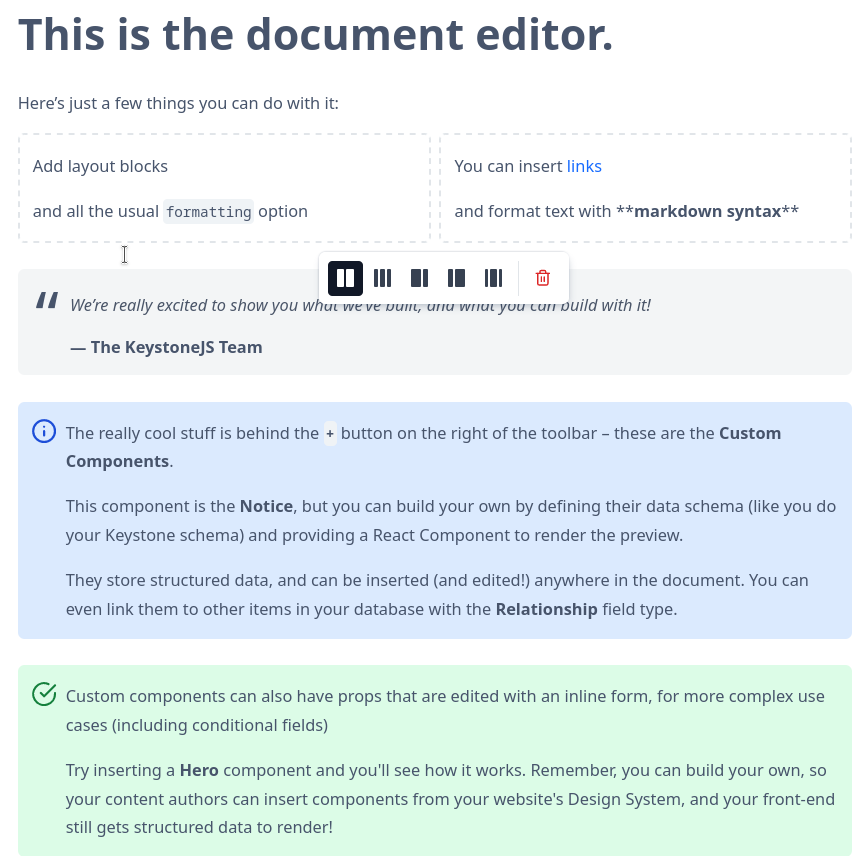
In the Document Fields Demo, try to click between the grid and the notice component, its unreachable.
**Please describe what you expected to happen:**
You can click between it and insert things there.
**Please add any screenshots if possible:**
**Please add contextual information such as your node version (node -v), or the web browser you used:**
Same problem for firefox / chrome.
There is a workaround for getting between the two notice components for example, when just double pressing enter from the above one. Unfortanetly this isnt possible in the grid (or other components we build ourselves).
Contributor guide
Research direction
Start with the Document Fields Demo at the linked documentation URL and reproduce the problem in Firefox or Chrome by clicking between the grid and notice component. Trace the document editor behavior around these custom components and compare it with the working double-Enter workaround. Done means the cursor can be placed between the grid and adjacent components so content can be inserted there.
Written by the indexing model from the issue text.
Assessment
- Tech stack
- react, typescript
- Domain
- frontend, web-dev
- Issue type
- Bug
- Difficulty
- 4/5
- Estimated time
- 3-5 days
- Activity status
- Stale
- Clarity
- Mostly clear
- Newbie friendliness
- 35/100