bug(mac): Switching Keyboard is not working in LibreOffice Writer
- Dominant language
- Pascal
- Stars
- 534
- Forks
- 143
- Avg merge
- 2d 10h
- Merged PRs (30d)
- 113
Description
### Describe the bug
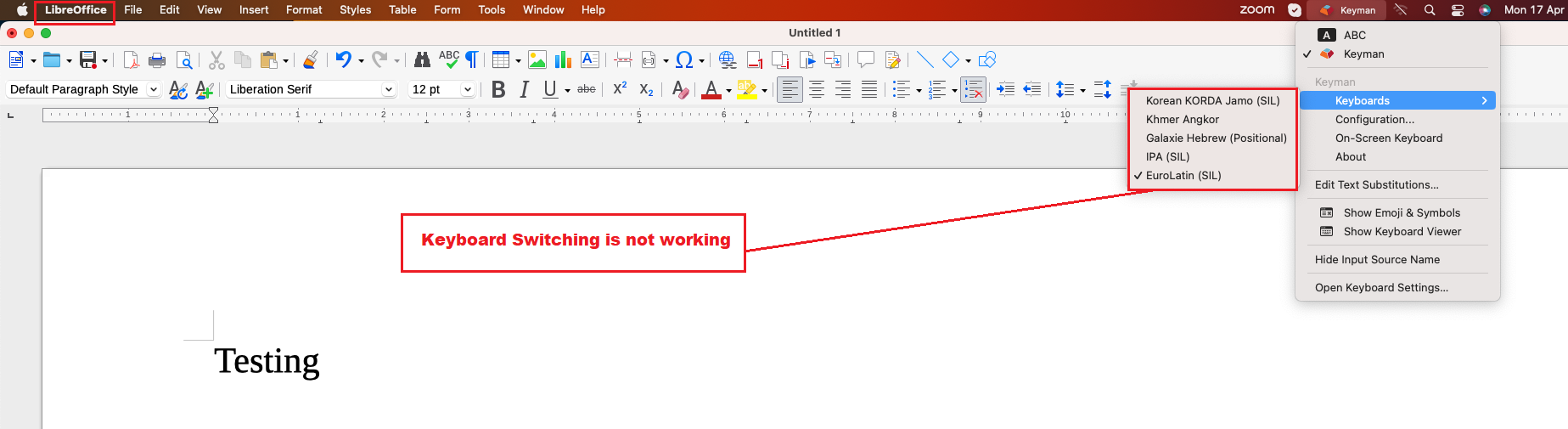
I noticed that Keyboard Switching is not working while using LibreOffice Writer application.
### Reproduce the bug
1. Install Keyman 17.0.87-alpha build in macOS.
2. Download and Install some keyboards like Khmer Angkor, SIL (IPA), Tamil99 etc., using Keyman Configuration dialog.
3. Open Notes application.
4. Enable Keyman Keyboard.
5. Click Khmer Angkor Keyboard.
6. Start typing in the Notes application.
7. Click SIL (IPA) keyboard from the Keyman Keyboard menu.
8. Start typing in the Notes application.
9. Here, the we may notice that the keyboard switching happens and we are able to type it on that language.
10. Open LibreOffice Writer application.
11. Click Khmer Angkor Keyboard.
12. Type xEjmr in the Writer app.
13. Here, I noticed that the keyboard is still using SIL (IPA) keyboard and not changed to Khmer Angkor keyboard.
Seems to be an issue. I have attached the Screenshot for your reference.
### Expected behavior
Switching between keyboards should work in LibreOffice Writer. (like it works in Notes app)
### Related issues
#8487
### Keyman apps
- [ ] Keyman for Android
- [ ] Keyman for iPhone and iPad
- [ ] Keyman for Linux
- [X] Keyman for macOS
- [ ] Keyman for Windows
- [ ] Keyman Developer
- [ ] KeymanWeb
- [ ] Other - give details at bottom of form
### Keyman version
17.0.87-alpha
### Operating system
13.3.1 Ventura OS
### Device
macMini M1
### Target application
_No response_
### Browser
_No response_
### Keyboard name
_No response_
### Keyboard version
_No response_
### Language name
_No response_
### Additional context
_No response_
Contributor guide
Assessment
This issue has not been assessed yet.