bug(windows): Info Icon changes its position in the Information Label after resizing the Keyman Configuration dialog
- Dominant language
- Pascal
- Stars
- 534
- Forks
- 143
- Avg merge
- 2d 10h
- Merged PRs (30d)
- 113
Description
### Describe the bug
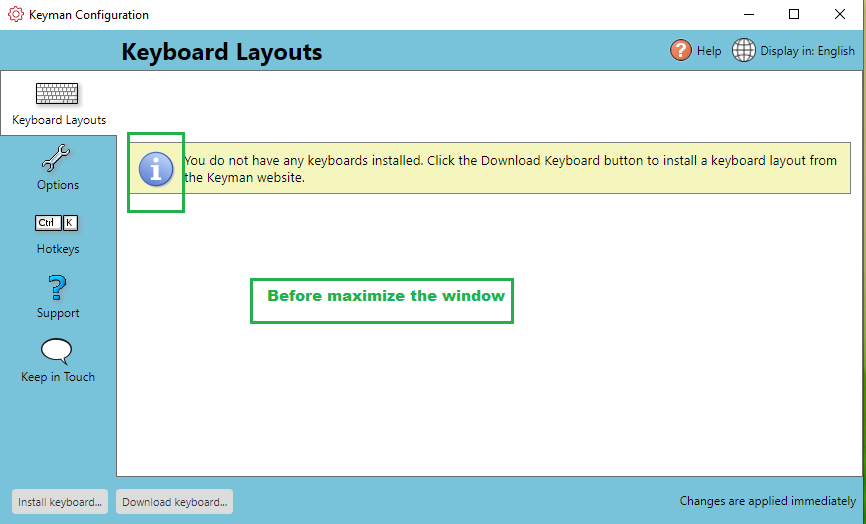
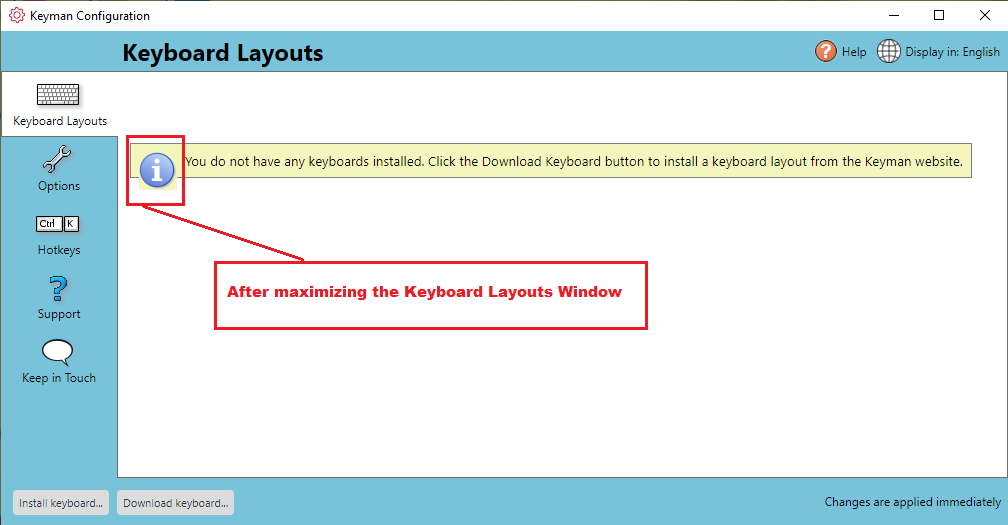
In the Keyboard Layout view, If I resize (maximize) the Keyman Configuration dialog, the Info Icon moves away from the border of the Information label.
### Reproduce the bug
1. Install Keyman 17.0.31-alpha build in Windows 10 OS.
2. Open Keyman Configuration dialog.
3. Click Keyboard Layouts tab.
4. Verify that there is an Information label "You do not have any keyboards installed. Click the Download Keyboard button to install a keyboard layout from the Keyman website" appears on the screen.
5. Maximize the window using Mouse.
Here, I noticed that the info icon from the Information Label moves away from its original position.
..before maximize
..after maximize the window
### Expected behavior
Maximizing the Keyboard Layout should not change the 'info icon' position in the Information label.
### Related issues
_No response_
### Keyman apps
- [ ] Keyman for Android
- [ ] Keyman for iPhone and iPad
- [ ] Keyman for Linux
- [ ] Keyman for macOS
- [X] Keyman for Windows
- [ ] Keyman Developer
- [ ] KeymanWeb
- [ ] Other - give details at bottom of form
### Keyman version
17.0.31-alpha
### Operating system
Window 10 OS
### Device
Windows Desktop
### Target application
_No response_
### Browser
_No response_
### Keyboard name
_No response_
### Keyboard version
_No response_
### Language name
_No response_
### Additional context
_No response_
Contributor guide
Assessment
This issue has not been assessed yet.