bug(windows): Not able to change the UI language on the Keyman Configuration window after changing the configuration tab(s)
- Dominant language
- Pascal
- Stars
- 534
- Forks
- 143
- Avg merge
- 2d 10h
- Merged PRs (30d)
- 113
Description
**Describe the bug**
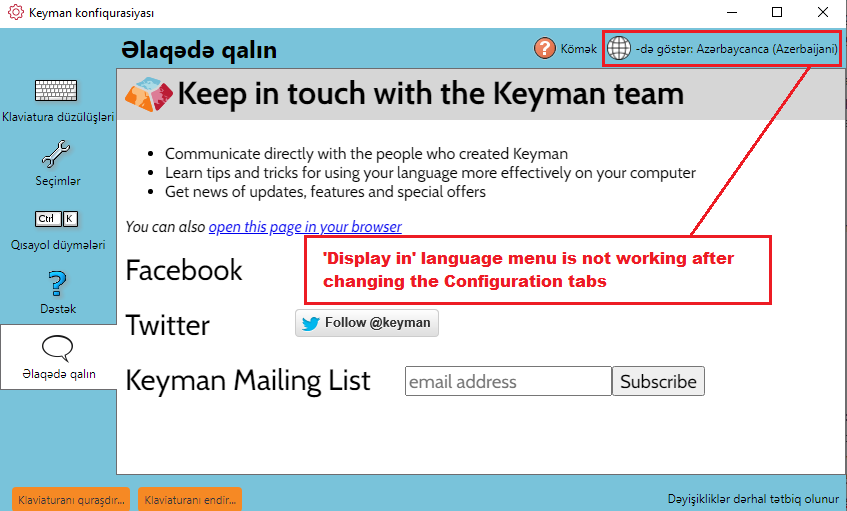
I noticed that after changing the UI language then changing the configuration tabs makes the Display in list menu freezes on the window. So, that I was not able to changing the UI language after that.
**To Reproduce**
1. Install Keyman 15.0.270 stable release.
2. Open Keyman Configuration.
3. Click 'Keep in touch' tab.
4. Click English - 'Display in' list menu.
5. Click 'Azerbaijani' language.
6. Verify that the UI language has been changed into Azerbaijani language.
7. Click 'Support' tab.
8. Select 'French' language.
9. Click once again 'Keep in touch' tab.
10. Select 'Azerbaijani' language once again.
11. I noticed that again clicking the 'Azerbaijani' language seems to be freezes on configuration window.
**Expected behavior**
The 'Display in' UI list menu should not get stuck after using the configuration tabs.
**Screenshots**
---
**Keyman for Windows:**
Device: Windows 10 Desktop
- OS: Windows 10 x64
- Keyman version: 15.0.70
- Target Application: Keyman Configuration Window
---
**Additional context**
1. Work around: Minimize the Configuration Window. Open some other windows from the desktop. Now, Maximize the Keyman Configuration window. This time, the Display in list menu is working properly.
2. I am able to reproduce this issue with all other UI languages which appears in the 'Display in' list menu.
3. Able to reproduce this issue in Keyman 16.0.70-alpha build.
Contributor guide
Assessment
This issue has not been assessed yet.