bug(windows): Khmer_Angkor Keyboard was missing in the Keyman Menu after installing IPA (SIL) keyboard from package
- Dominant language
- Pascal
- Stars
- 534
- Forks
- 143
- Avg merge
- 2d 10h
- Merged PRs (30d)
- 113
Description
**Description**
After installing an IPA (SIL) Keyboard from a package (from the local disk), I noticed that the Khmer_Angkor Keyboard that I have already installed was missing from the Keyman menu.
**To Reproduce**
1. Install Keyman 16.0.13-alpha build
2. Open Configuration menu.
3. Click 'Download keyboard..' button.
4. Type 'Khmer_Angkor' in the Keyboard Search bar.
5. Click Install Keyboard button.
6. Verify that the Khmer_Angkor Keyboard appears in the Keybord Layouts menu.
7. From the taskbar, open Keyman menu.
8. Verify that the Khmer_Angkor Keyboard appears in the menu.
9. Download sil_ipa.kmp file from Keyman.com to Local disk.
10. Install the Package.
11. Verify that the IPA (SIL) Keyboard appears in the Keyman menu.
Here, I noticed that the 'Khmer_Angkor' keyboard was missing in the Keyman menu. I was not able to use it even though it appears in the Configuration dialog.
**Expected behavior**
Khmer_Angkor Keyboard should appear in the Keyman Menu.
**Screenshots**
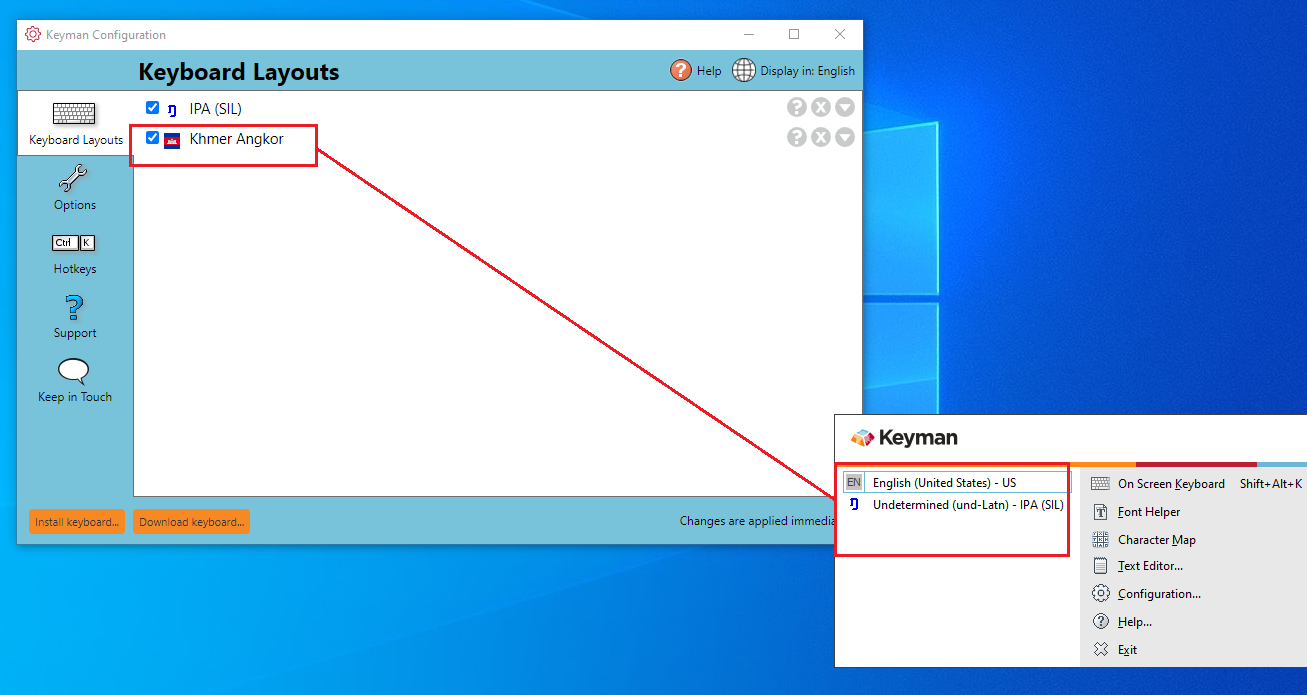
---
**Keyman for Windows:**
- OS: Windows 10 x64
- Keyman version: 16.0.13-alpha
- Target Application: Keyman
---
**Keyboard**
- Keyboard name: khmer_angkor
- Keyboard version: 1.0.1
- Language name: Khmer
Contributor guide
Assessment
This issue has not been assessed yet.