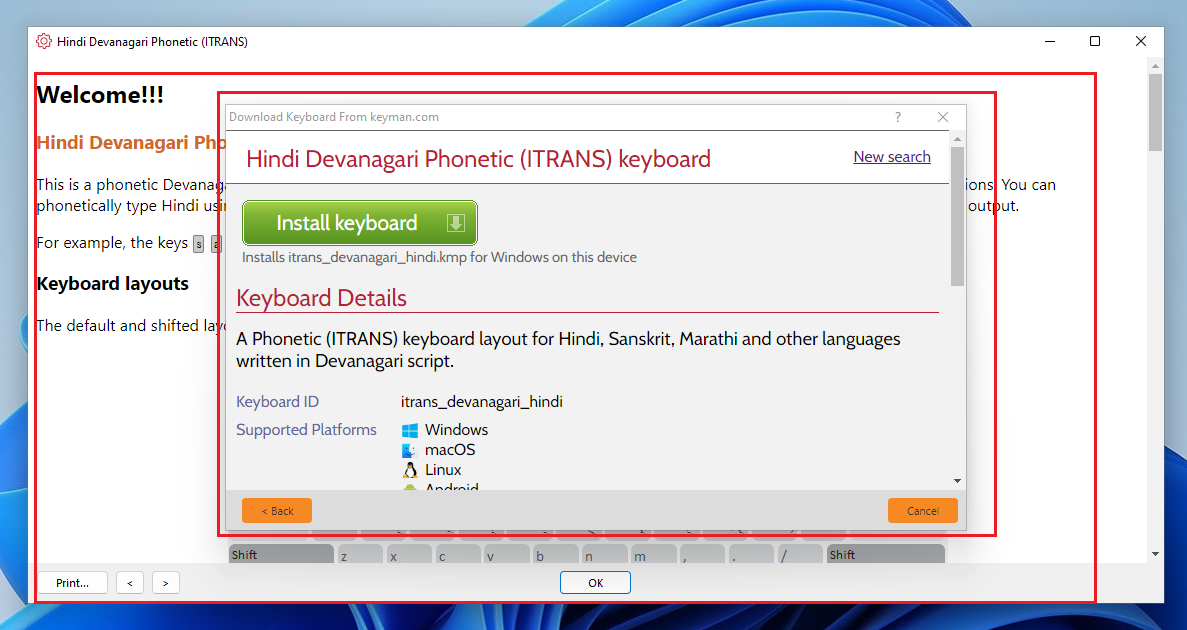
bug(Windows): Welcome Screen appears behind the 'Download Keyboard From keyman.com' dialog after installing a Keyboard
- Dominant language
- Pascal
- Stars
- 534
- Forks
- 143
- Avg merge
- 2d 10h
- Merged PRs (30d)
- 113
Description
**Description**
Welcome dialog appears behind the 'Download Keyboard From keyman.com' dialog after installing any Keyboard.
**To Reproduce**
1. Open Keyman Configuration dialog.
2. Click Download Keyboard button.
3. Type 'Hindi Deva' in the Keyboard Search bar.
4. From the results, Click 'Hindi Devanagiri Phonetic (ITRANS)' Keyboard. It opens Hindi Devanagiri Phonetic keyboard view.
5. Click 'Install keyboard' button.
6. Verify that the Install Keyboard/Package dialog opens.
7. Click the 'Install' button. A warning message appears ' Do you want to allow this app to make chagnes to your device?' with 'Yes' and 'No' button.
8. Click Yes button. We may notice that the 'Welcome' Screen appears behind the 'Download Keyboard.." dialog.
9. Clicking on the options from the 'Download Keyboard From keyman.com' does not do anything.
Seems to be an issue. (Please, see the following Screenshot)
**Expected behavior**
Welcome dialog should appear before the 'Download Keyboard From keyman.com' dialog.
**Screenshots**
---
**Keyman for Windows/macOS/Linux:**
- OS: Windows 10 x86, Windows 11 x64
- Keyman version: Keyman 15.0.251 beta
- Target Application: Keyman Configuration
---
**Keyboard**
- Keyboard name: Hindi Devanagari Phonetic (ITRANS)
- Keyboard version: 1.2.0
- Language name: Hindi
**Additional context**
Anyhow, If I click on the OK button from the Welcome Screen all the related windows are closed.
Contributor guide
Assessment
This issue has not been assessed yet.