bug(windows): keyboard profiles damaged
- Dominant language
- Pascal
- Stars
- 534
- Forks
- 143
- Avg merge
- 2d 10h
- Merged PRs (30d)
- 113
Description
**Describe the bug**
Accidentally uninstall Keyman without removing all installed keyboard causing damage to the keyboard profile and there is a prompt to fix this each time Configuration is opened.
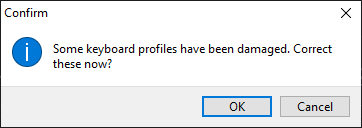
Click OK to trigger a fix (probably), but this error occurs.
Details for error report for Keyman app:
Application Identifier: kmshell-14.0.265-beta
Error Identifier: DB5BE7E543B24E0C93DFFF4EFB0A67FB
**To Reproduce**
1. Uninstall Keyman without removing existing keyboards and don't restart just yet
2. Reinstall any version of Keyman beta and then follow the prompt to install the latest beta
3. Restart to finish the installation
4. See error
**Expected behavior**
No instructions provided on how to correct the damaged keyboard profiles. But the box read "Some keyboard profiles have been damaged. Correct these now?" pops up each time the Configuration is triggered.
---
**Keyman for Windows:**
- OS: Windows 10 Pro 20H2 x64
- Keyman version: 14.0.262-beta upgraded to 14.0.265-beta
- Target Application: Keyman
---
**Additional context**
diag report can be found with case 4522, it can also be accessed [here](https://drive.google.com/file/d/1MqR5mwXJIjMty0_aYjORdWMWzTudm566/view?usp=sharing).
Contributor guide
Assessment
This issue has not been assessed yet.