bug(mac): duplicate of the same keyboard in the keyboard menu
- Dominant language
- Pascal
- Stars
- 534
- Forks
- 143
- Avg merge
- 2d 10h
- Merged PRs (30d)
- 113
Description
**Describe the bug**
The keyboard menu and the keyboard list in the Configuration do not sync. When installing the same keyboard twice, the keyboard menu shows two keyboards with the same name; while the Configuration only lists one.
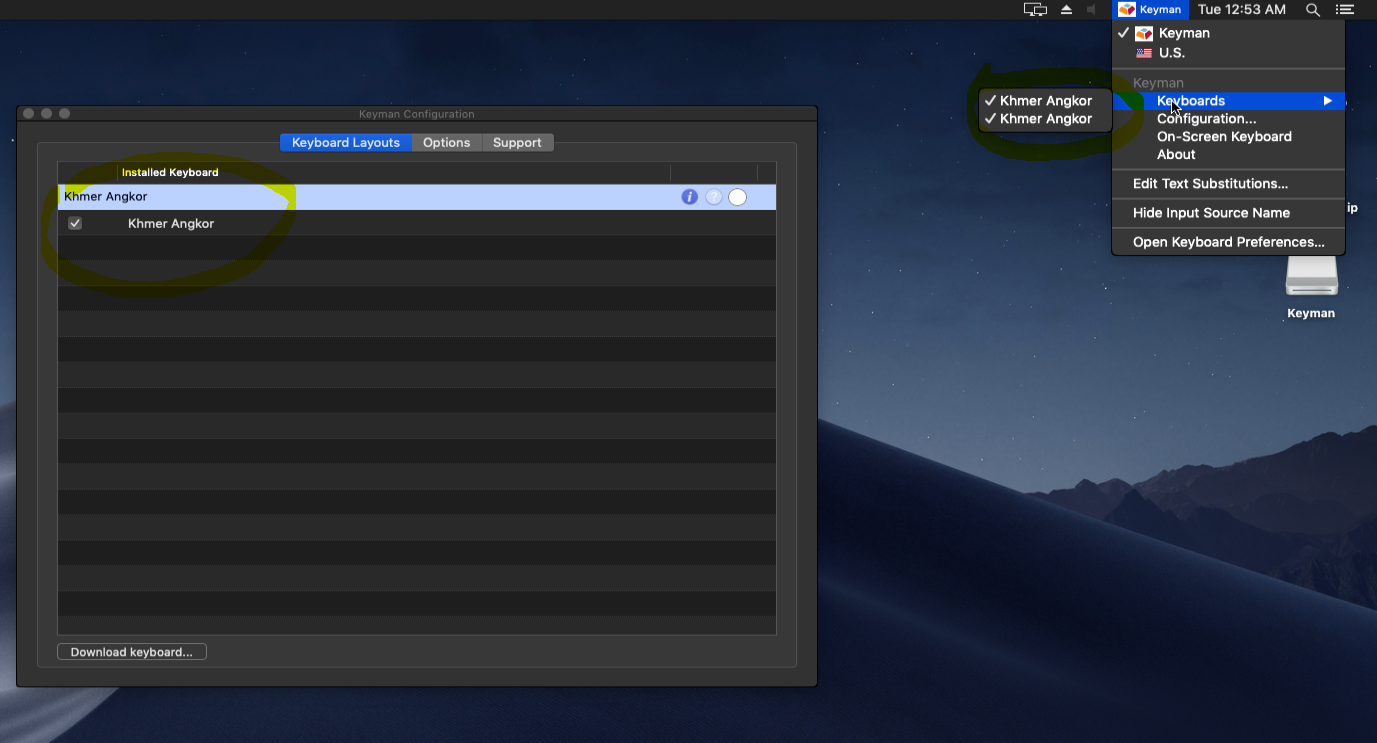
**To Reproduce**
1. Go to 'Configuration'
2. Click on 'Download keyboard...' to install "Khmer Angkor"
3. Download and install the keyboard again
4. Click on the Keyman icon on the taskbar to see the keyboard menu listing Khmer Angkor twice
**Expected behavior**
When the same keyboard is installed, the user should be notified that the same has already been installed. Or something along that line.
---
**Keyman for macOS:**
- OS: macOS Mojave 10.14.6
- Keyman version: 14.0.229-beta
- Target Application: self
---
**Keyboard**
- Keyboard name: khmer_angkor
- Keyboard version: 1.0.7
- Language name: Khmer
Contributor guide
Assessment
This issue has not been assessed yet.