feat(windows): searching for a language from the Add Language to Keyboard
- Dominant language
- Pascal
- Stars
- 534
- Forks
- 143
- Avg merge
- 2d 10h
- Merged PRs (30d)
- 113
Description
**Describe the bug**
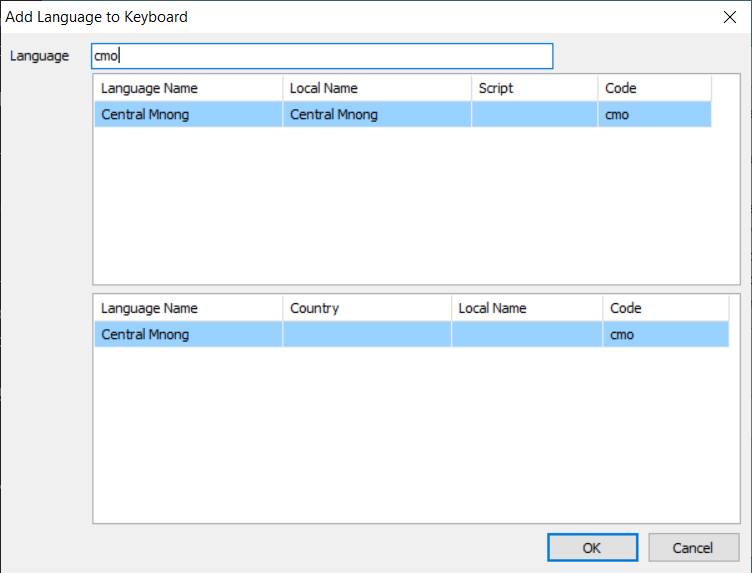
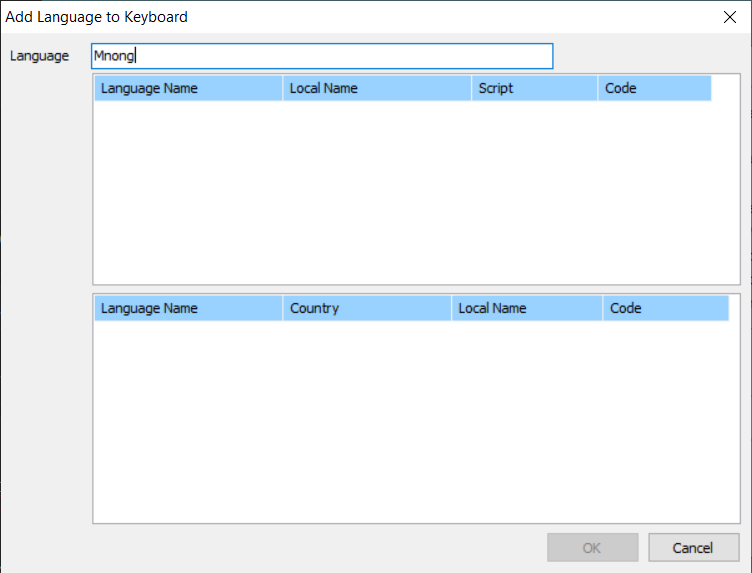
It looks like not any language name can be searched for in the language field. I would like to search for "Mnong". Typing "Mnong" in the field would not yield the expected language, unless typing in "cmo".
When typing in "cmo":
When typing in "Mnong":
**To Reproduce**
1. Go to 'Configuration'
2. Click on a keyboard, say 'Khmer Angkor' to expand
3. Typing in the language field "cmo" and then "Mnong"
4. See the different results
**Expected behavior**
"Mnong" in the language field should yield the expected language as that is probably more intuitive to the users. Typing its alternate name "Bunong" should also yield the language.
---
**Keyman for Windows:**
- OS: Windows 10 Pro 1909 x64
- Keyman version: 14.0.214-beta
- Target Application: Configuration
Contributor guide
Assessment
This issue has not been assessed yet.