keybase / keybase/keybase-issues
KB on my windows 10 PC issue
- Dominant language
- No language data
- Stars
- 899
- Forks
- 40
- PR merge metrics
- No merged PRs in 30d
Description
I have a few issues, I am new to this so bare with me here. I have KB installed on my Android device with no issues to date, I also installed it on my Windows 10 PC, but for the life of me, when I click on the app in the windows 10 app, it opens a dialog box which ask me for my username and passphrase, which I do, but then it ask me to go to the app and add a device, well I cannot find that option anywhere.
I also try logging in from a browser with my Username and Passphrase, but it keeps saying passphrase is incorrect, I tried them all upper case, lowercase, with spaces etc. still does not work, I know the passphrase is correct as I wrote it down.
Any suggestions how I can get this to work on my Windows 10 PC again, I did uninstall and reinstall, same issue, I also did this 3 times and does not show a K drive, I also did turn off my AV when installing, also how can I simply log in from a browser, I'm scare to reset the password or passphrase and then be locked out of my Android app.
Any guidance for a new player on this device, bare with me if I don't get it, I will in time.
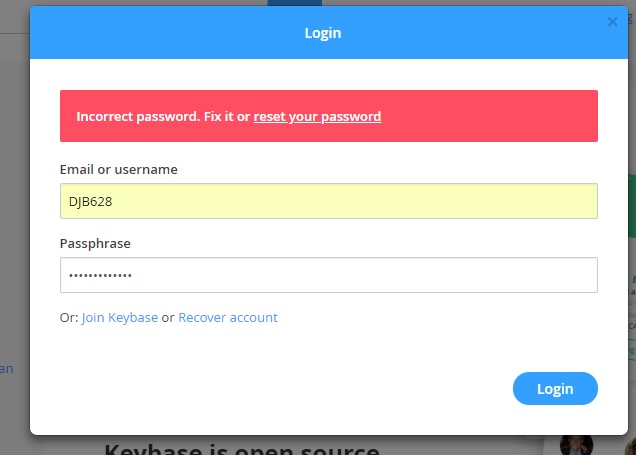
DJB
Contributor guide
No contributing guide indexed for this repository
Research direction
Start with the Windows 10 app login and device-add flow, then compare it with the browser login described in the issue. Review the existing comment thread for the intended enrollment and passphrase behavior; done would require a reproducible diagnosis and a clearly identified client or documentation change.
Written by the indexing model from the issue text.
Assessment
- Domain
- authentication, desktop
- Issue type
- Bug
- Difficulty
- 4/5
- Estimated time
- 3-5 days
- Activity status
- Stale
- Clarity
- Needs clarification
- Newbie friendliness
- 15/100