keybase / keybase/keybase-issues
Must Restart Keybase Client To Disable #general Chat Channel On Subteam
- Dominant language
- No language data
- Stars
- 899
- Forks
- 40
- PR merge metrics
- No merged PRs in 30d
Description
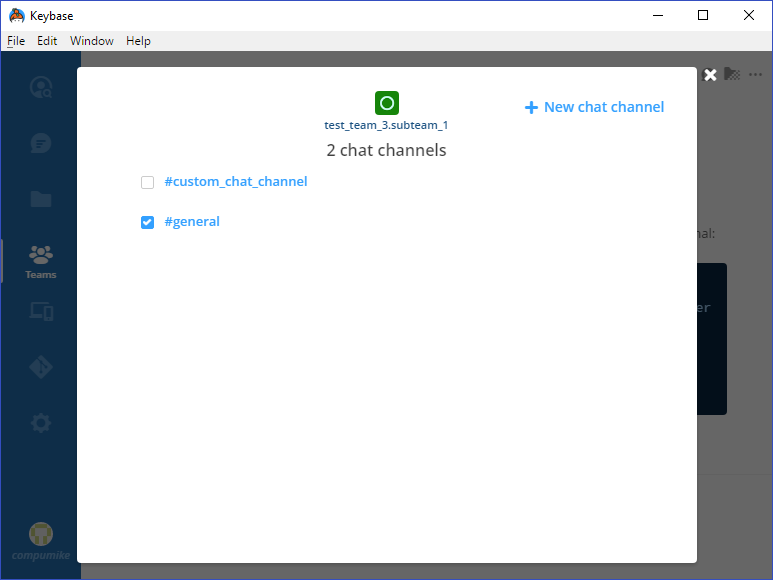
After creating a new sub-team, I tried to disable the `#general` chat channel on the sub-team, but when I clicked on the checkbox to uncheck it nothing happened. I tried quitting the Keybase client entirely and starting it back up again, and then I was able to successfully disable the `#general` chat channel.
I tried this twice with two separate sub-teams (from two different parent teams), and both times after creating the new sub-team I had to quit Keybase and restart it before I could disable the `#general` channel on the sub-teams.
Please fix this issue so that newly created sub-teams can have their `#general` channel disabled immediately without restarting Keybase.
NOTE: This problem **only** exists for the `#general` channel. If I create a new custom chat channel for a newly created sub-team, I can disable that new custom chat channel immediately without restarting Keybase.
my log id: c6b1d88ab74956b4e1c9211c
Contributor guide
No contributing guide indexed for this repository
Research direction
No source file, test, or entry point is named. Reproduce the problem by creating a sub-team, comparing the #general checkbox with a custom channel, and checking whether restarting the client changes the result. Done means #general can be disabled immediately after sub-team creation without restarting Keybase.
Written by the indexing model from the issue text.
Assessment
- Domain
- desktop
- Issue type
- Bug
- Difficulty
- 4/5
- Estimated time
- 3-5 days
- Activity status
- Stale
- Clarity
- Mostly clear
- Newbie friendliness
- 25/100