Cannot add Keybase folder to Explorer in Windows
Nobody has claimed this yet.
- Dominant language
- Go
- Stars
- 9.2k
- Forks
- 1.3k
- Avg merge
- 12h 58m
- Merged PRs (30d)
- 56
Description
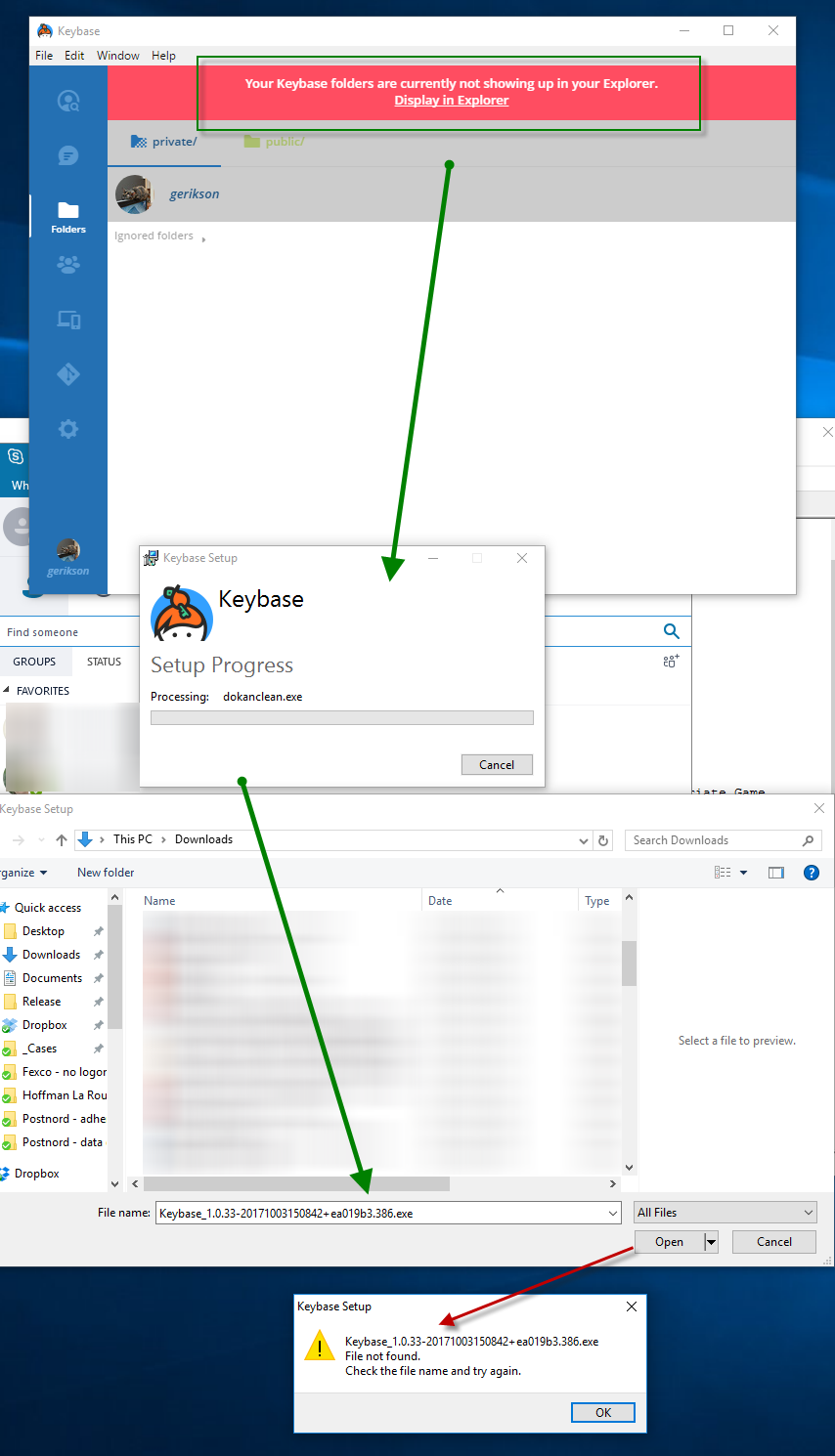
Windows app, File area. Click the "Display in Explorer".
"Repair" option in installer is prompted. Click it to start.
Installer prompts for EXE: Keybase_1.0.33-20171003150842+ea019b3.386.exe, default folder is my Downloads folder. However this file is not found there. Pressing cancel cancels the operation.
- Screenshot 01
- Log file Keybase_20171005083857.log
I try again, this time searching for the file name on my PC. I find it in the folder
C:\Users\gustafe\AppData\Local\Package Cache{8029599c-5d18-407a-9bc1-5b7875d899d5}
However, pasting that path into the Find File prompt and selecting the file fails the install.
- Log file Keybase_20171005084018.log
Contributor guide
No contributing guide indexed for this repository
First steps
- Read the whole issue, then the project's contributing guide.
- Comment on the issue to say you are picking it up — it saves two people doing the same work.
- Fork the repository and make your change on a branch.
- Open a pull request that references the issue number.
Research direction
Start by reading Keybase_20171005083857.log and Keybase_20171005084018.log, then reproduce the Windows app's File-area “Display in Explorer” repair flow with Keybase_1.0.33-20171003150842+ea019b3.386.exe in the Package Cache path. Done means the repair/install accepts the discovered executable and adds the Keybase folder to Explorer.
Written by the indexing model from the issue text.
Assessment
- Domain
- desktop, operating-systems
- Issue type
- Bug
- Difficulty
- 4/5
- Estimated time
- 3-5 days
- Activity status
- Stale
- Clarity
- Needs clarification
- Newbie friendliness
- 35/100