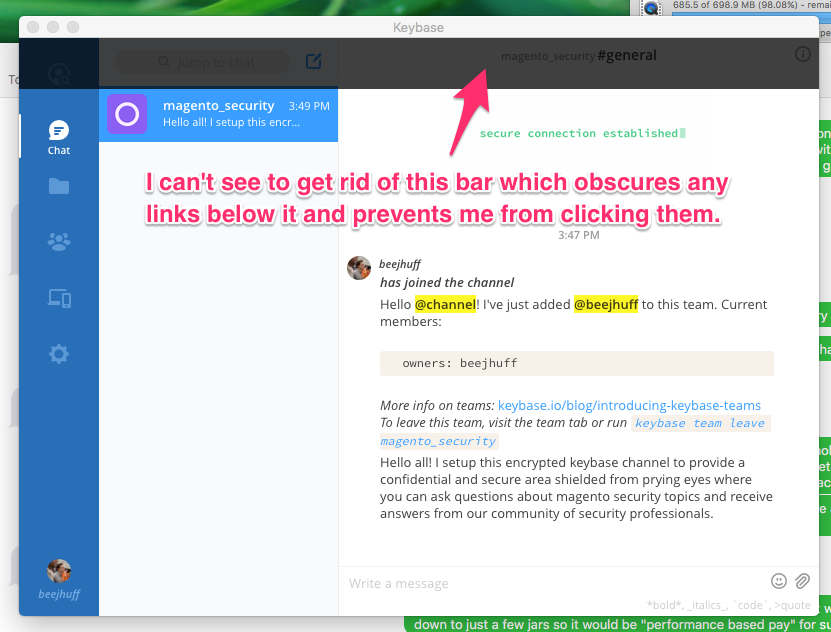
After failing to create a team, the error message window remains displayed, preventing a user from clicking any links displayed beneath it
Open
Nobody has claimed this yet.
- Dominant language
- Go
- Stars
- 9.2k
- Forks
- 1.3k
- Avg merge
- 12h 58m
- Merged PRs (30d)
- 56
Description
Keybase GUI Version: 1.0.30-20170915193210+8c3c799f2
The screenshot included below should provide a basic level of detail surrounding the problem.
Steps to reproduce issue:
- Login to keybase
- Click "Teams" menu option on left navigation menu
- Click "Add Team" link
- Enter a name for a team that will be rejected. I have attempted using the following all of which were rejected:
- magento
- magento-security
- magento_certification
- The black user interface background used as a backdrop over which the error message is displayed is never removed from the screen and it prevents the user from clicking any links displayed beneath it.
I'm running Mac OS X 10.11.6 (15G1611)
Contributor guide
No contributing guide indexed for this repository
First steps
- Read the whole issue, then the project's contributing guide.
- Comment on the issue to say you are picking it up — it saves two people doing the same work.
- Fork the repository and make your change on a branch.
- Open a pull request that references the issue number.
Research direction
Reproduce the Teams > Add Team flow with a rejected team name and observe the error window and its backdrop. Trace the GUI's failed team-creation path and modal cleanup; the issue is done when the backdrop is removed after the error and links beneath the message can be clicked again.
Written by the indexing model from the issue text.
Assessment
- Tech stack
- react, react-native
- Domain
- frontend
- Issue type
- Bug
- Difficulty
- 3/5
- Estimated time
- 1-2 days
- Activity status
- Stale
- Clarity
- Mostly clear
- Newbie friendliness
- 42/100