Vertical screen spacing when using Personal Hotspot on iOS
Nobody has claimed this yet.
- Dominant language
- Go
- Stars
- 9.2k
- Forks
- 1.3k
- Avg merge
- 12h 58m
- Merged PRs (30d)
- 56
Description
Personal Hotspot puts a blue bar at the top of the screen that pushes down the viewport. This causes the text-entry box of Keybase chat to sink a little below the top of the keyboard area, making it difficult to view what is being typed. The screenshot below should make this obvious (I'm using the Gboard keyboard, but it also occurs with the native iOS keyboard).
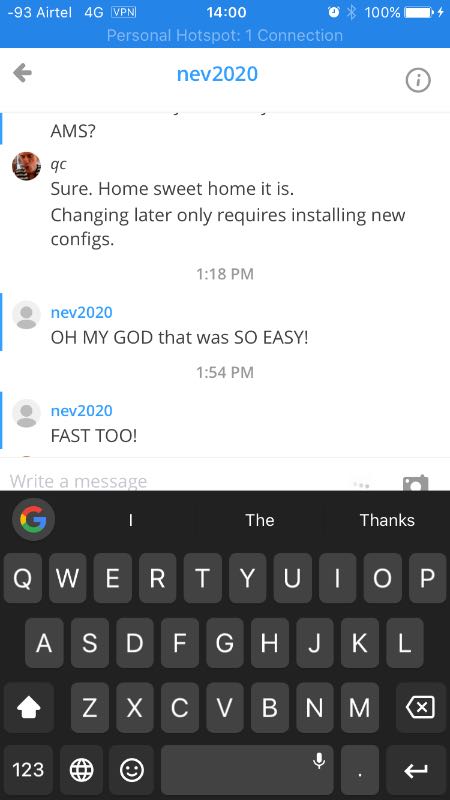
The text-entry box should be fixed to the bottom of the viewport so that it is always visible no matter how much vertical space is available.
Bonus addition: it would be nice if the text-entry box had an option to expand full-screen like the twitter client for writing longer messages. ;)
Contributor guide
No contributing guide indexed for this repository
First steps
- Read the whole issue, then the project's contributing guide.
- Comment on the issue to say you are picking it up — it saves two people doing the same work.
- Fork the repository and make your change on a branch.
- Open a pull request that references the issue number.
Research direction
Start from the Keybase chat text-entry UI on iOS and reproduce the layout with Personal Hotspot enabled using both the Gboard and native iOS keyboards. The issue is done when the text-entry box remains visible at the bottom of the viewport regardless of the available vertical space.
Written by the indexing model from the issue text.
Assessment
- Tech stack
- ios, react-native
- Domain
- mobile
- Issue type
- Bug
- Difficulty
- 3/5
- Estimated time
- 1-2 days
- Activity status
- Stale
- Clarity
- Mostly clear
- Newbie friendliness
- 42/100