Gnome3 - Menu appears incorrectly on second monitor
Nobody has claimed this yet.
- Dominant language
- Go
- Stars
- 9.2k
- Forks
- 1.3k
- Avg merge
- 12h 58m
- Merged PRs (30d)
- 56
Description
Keybase GUI Version: 1.0.25-20170707160054+e83276d
Happens every time I click the Keybase tray icon -- Attempted to highlight the issue in this screenshot:
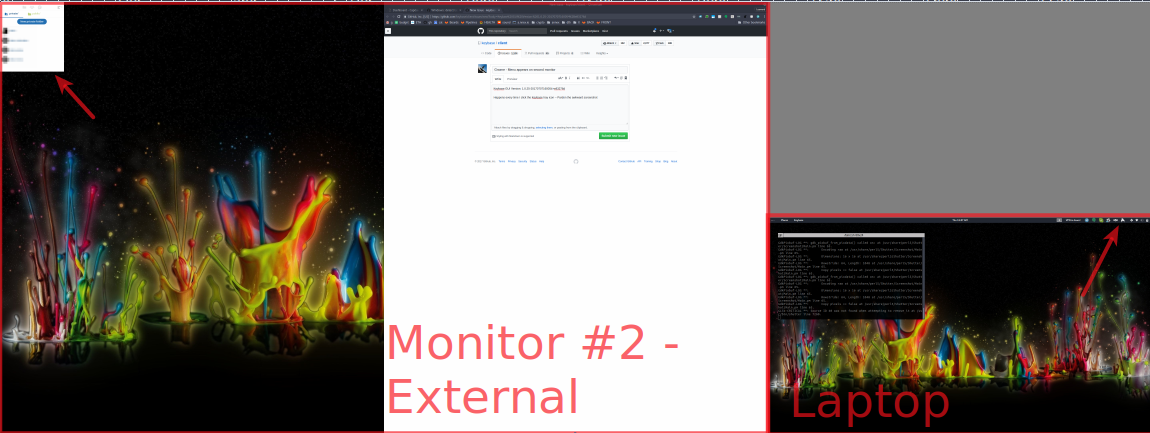
Clicking Keybase icon causes menu to appear on the wrong-corner-of-the-wrong-display; on the right is my tray and the Keybase icon, but menu shows up so far away, I didn't even see it at first.
Gnome Shell 3, Ubuntu 17.04
Contributor guide
No contributing guide indexed for this repository
First steps
- Read the whole issue, then the project's contributing guide.
- Comment on the issue to say you are picking it up — it saves two people doing the same work.
- Fork the repository and make your change on a branch.
- Open a pull request that references the issue number.
Research direction
Start by reproducing the issue in Keybase GUI 1.0.25 on GNOME Shell 3 and Ubuntu 17.04 with two monitors, then click the Keybase tray icon. Done means the menu appears next to the tray icon on the correct display rather than in the wrong corner of the other display.
Written by the indexing model from the issue text.
Assessment
- Tech stack
- electron, linux, ubuntu
- Domain
- desktop
- Issue type
- Bug
- Difficulty
- 3/5
- Estimated time
- 1-2 days
- Activity status
- Stale
- Clarity
- Mostly clear
- Newbie friendliness
- 35/100