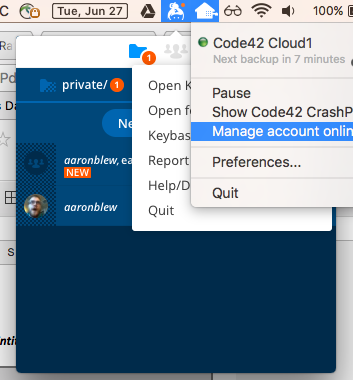
The "tray" icon will stay open even after other tray items have been opened.
Nobody has claimed this yet.
- Dominant language
- Go
- Stars
- 9.2k
- Forks
- 1.3k
- Avg merge
- 12h 58m
- Merged PRs (30d)
- 56
Description
In this example, I've clicked the Keybase tray icon, and then clicked an adjacent tray icon. In the screenshot you can see that the Keybase icon stays open despite the other tray icon being selected. I can close the Keybase icon by clicking it again.
Thanks!
Keybase GUI Version: 1.0.24-20170619144856+91a6943
Contributor guide
No contributing guide indexed for this repository
First steps
- Read the whole issue, then the project's contributing guide.
- Comment on the issue to say you are picking it up — it saves two people doing the same work.
- Fork the repository and make your change on a branch.
- Open a pull request that references the issue number.
Research direction
Reproduce the tray behavior described in the issue: open the Keybase tray icon, select an adjacent tray icon, and check whether the Keybase icon remains open. Trace the desktop tray entry point to identify the relevant state handling; done means selecting another tray item closes the Keybase icon, while selecting it again still closes it as described.
Written by the indexing model from the issue text.
Assessment
- Domain
- desktop-dev
- Issue type
- Bug
- Difficulty
- 4/5
- Estimated time
- 3-5 days
- Activity status
- Stale
- Clarity
- Mostly clear
- Newbie friendliness
- 20/100