Main App not visible
- Dominant language
- Go
- Stars
- 9.2k
- Forks
- 1.3k
- PR merge metrics
- PR metrics pending
Description
Keybase GUI Version: 6.0.1-20220609140211+0fc9feea3d
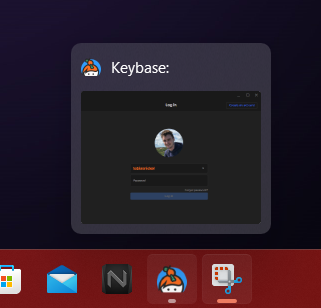
The main app is suddenly not visible on a Windows 11 advice. The window appears to be open (see attach), but is no where to find. It's not possible to move the window via [windows] + [shift] + [arrow key] or whatelse, because it's not hidden, it's somehow not present.
Reboot of computer and reinstallation of keybase didn't help.
Contributor guide
No contributing guide indexed for this repository
Research direction
Start by reproducing the missing-window behavior in the Keybase GUI on Windows 11 with version 6.0.1-20220609140211+0fc9feea3d, using the attached screenshot as context. Done means the main app window is visible and can be located after rebooting and reinstalling Keybase.
Written by the indexing model from the issue text.
Assessment
- Tech stack
- electron, go
- Domain
- desktop, operating-systems
- Issue type
- Bug
- Difficulty
- 4/5
- Estimated time
- 3-5 days
- Activity status
- Stale
- Clarity
- Needs clarification
- Newbie friendliness
- 25/100