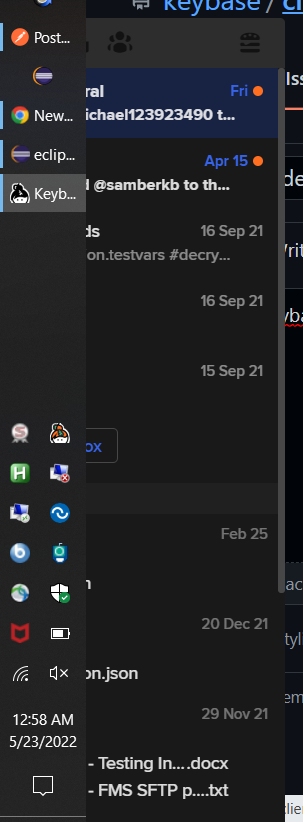
Keybase app is hidden behind Windows taskbar when taskbar is on left side of screen
Open
Nobody has claimed this yet.
- Dominant language
- Go
- Stars
- 9.2k
- Forks
- 1.3k
- Avg merge
- 12h 58m
- Merged PRs (30d)
- 56
Description
Keybase GUI Version: 5.9.0-20211216221810+9b33c9201f
Here is my Keybase app, trapped on the left side of the screen near my Windows taskbar, which I perfer on my left side. The Keybase app cannot be dragged away from this position or resized.
Here is how the Keybase app displays (correctly?) when I move my taskbar to the bottom:

Contributor guide
No contributing guide indexed for this repository
First steps
- Read the whole issue, then the project's contributing guide.
- Comment on the issue to say you are picking it up — it saves two people doing the same work.
- Fork the repository and make your change on a branch.
- Open a pull request that references the issue number.
Research direction
No files or tests are named in the issue. Reproduce the Keybase GUI on Windows with the taskbar positioned on the left, then locate the desktop window-positioning entry point; done means the app is not hidden behind the taskbar and can be dragged and resized normally.
Written by the indexing model from the issue text.
Assessment
- Tech stack
- electron, go
- Domain
- desktop
- Issue type
- Bug
- Difficulty
- 4/5
- Estimated time
- 3-5 days
- Activity status
- Stale
- Clarity
- Mostly clear
- Newbie friendliness
- 35/100