Keybase Window Launching on "Hidden Desktop"
- Dominant language
- Go
- Stars
- 9.2k
- Forks
- 1.3k
- Avg merge
- 12h 58m
- Merged PRs (30d)
- 56
Description
Keybase GUI Version: 5.8.0-20210920151148+ac2177aec7
I am running Windows 10 on a Dell Optiplex 9020. I usually have two monitors, but I am limited to one at the moment. I'm positive I last used Keybase on my second screen, but now I cannot bring the window into view at all. I tried all of these [steps](https://www.technipages.com/bring-off-screen-window-back-onto-screen), but none would work for Keybase.
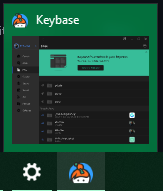
I can see the window is open when I hover over the icon on the taskbar.
Contributor guide
No contributing guide indexed for this repository
Research direction
Start by reproducing the Keybase GUI behavior on Windows 10 with one monitor after the window was last used on a second display. Confirm that the window can be brought back into view and that its position remains usable when the monitor setup changes.
Written by the indexing model from the issue text.
Assessment
- Domain
- desktop
- Issue type
- Bug
- Difficulty
- 3/5
- Estimated time
- 1-2 days
- Activity status
- Stale
- Clarity
- Needs clarification
- Newbie friendliness
- 25/100