keybase on macOS - Command Q Does not Quit / Adhere to Apple's Human Interface Guidelines
- Dominant language
- Go
- Stars
- 9.2k
- Forks
- 1.3k
- Avg merge
- 12h 58m
- Merged PRs (30d)
- 56
Description
According to Apple's Human Interface Guidelines, pressing "Command-Q" should "Quit the app" - these guidelines are defined here: https://developer.apple.com/design/human-interface-guidelines/macos/user-interaction/keyboard/.
Current Behavior:
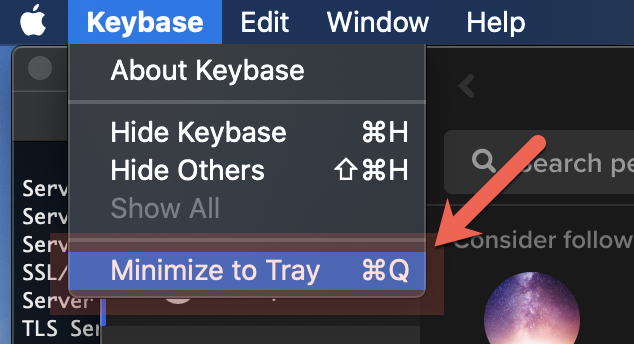
"Command-Q" minimizes the application to the macOS Dock (note: I also do not know if macOS has user interface element called the "Tray" as described in the Keybase's "Keybase" menu item).
Expected Behavior:
It is expected that the Human Interface Guidelines be adhered to and "Command-Q" quits the particular application.
This behavior is not in accordance with the Human Interface Guidelines standards.
I have attached a screenshot of the functionality that does no adhere to these standards.
Contributor guide
No contributing guide indexed for this repository
Research direction
No source file, test, or entry point is identified in the issue. Start by locating the macOS application's Command-Q handling and compare it with the described behavior; done means Command-Q quits the application rather than minimizing it to the Dock, with a regression check for that behavior.
Written by the indexing model from the issue text.
Assessment
- Tech stack
- macos
- Domain
- desktop
- Issue type
- Bug
- Difficulty
- 3/5
- Estimated time
- 1-2 days
- Activity status
- Stale
- Clarity
- Mostly clear
- Newbie friendliness
- 35/100