Windows KBFS: Cannot find C:\WINDOWS\system32\k
Nobody has claimed this yet.
- Dominant language
- Go
- Stars
- 9.2k
- Forks
- 1.3k
- Avg merge
- 12h 58m
- Merged PRs (30d)
- 56
Description
When attempting to open the KBFS Explorer folder from the Keybase GUI, I get the following popup error.
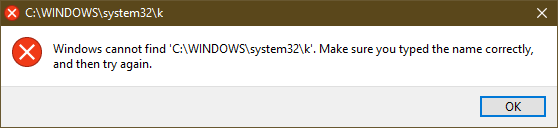
I have just uninstalled the old Dokan, rebooted and installed the new one as prompted by Keybase. The K: drive is unavailable when I go to it directly in Explorer.
Keybase GUI Version: 4.3.2-20190819141105+b1c5c7c912
Contributor guide
No contributing guide indexed for this repository
First steps
- Read the whole issue, then the project's contributing guide.
- Comment on the issue to say you are picking it up — it saves two people doing the same work.
- Fork the repository and make your change on a branch.
- Open a pull request that references the issue number.
Research direction
The report concerns the Windows KBFS Explorer path, the K: drive, and Dokan after replacing the old Dokan installation; no source file or test is named. Start by reproducing the failure with Keybase GUI 4.3.2 and inspect the Windows KBFS/Dokan integration. Done means the Explorer folder opens and the K: drive is available without the reported error.
Written by the indexing model from the issue text.
Assessment
- Tech stack
- go
- Domain
- desktop, operating-systems
- Issue type
- Bug
- Difficulty
- 4/5
- Estimated time
- 3-5 days
- Activity status
- Stale
- Clarity
- Needs clarification
- Newbie friendliness
- 20/100