Mac: Add an existing Stellar account with public key/address only
Nobody has claimed this yet.
- Dominant language
- Go
- Stars
- 9.2k
- Forks
- 1.3k
- Avg merge
- 12h 58m
- Merged PRs (30d)
- 56
Description
What I did
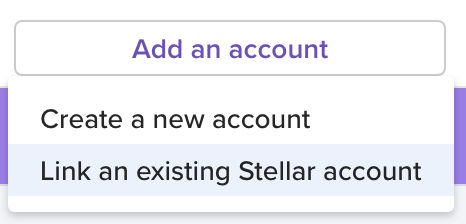
I went to the Wallet page in the Mac Keybase app and clicked Add an account. A dropdown list of options appeared and I selected Link an existing Stellar account.
What happened
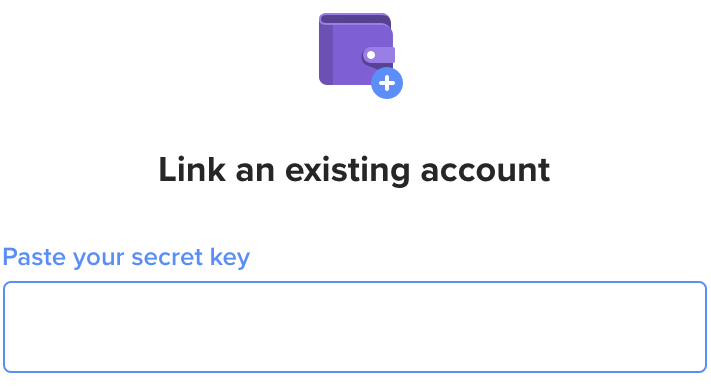
A window appeared requesting that I share the secret key.
What I expected to happen
A window to appear to allow me to enter either a public key/address only, or a secret key, so that I could add a second existing account I have as part of my identities without storing the secret key in Keybase.
Why did I expect this
Bitcoin and Zcash addresses can be added to Keybase with just the public key/address.
Contributor guide
No contributing guide indexed for this repository
First steps
- Read the whole issue, then the project's contributing guide.
- Comment on the issue to say you are picking it up — it saves two people doing the same work.
- Fork the repository and make your change on a branch.
- Open a pull request that references the issue number.
Research direction
Start from the Mac Keybase Wallet page and its Add an account flow, then trace the existing Link an existing Stellar account path. Verify that the flow accepts a public key/address without requiring a secret key while retaining the secret-key option, and that the account is added to the user's identities.
Written by the indexing model from the issue text.
Assessment
- Tech stack
- go, macos
- Domain
- blockchain
- Issue type
- Feature
- Difficulty
- 4/5
- Estimated time
- 3-5 days
- Activity status
- Stale
- Clarity
- Mostly clear
- Newbie friendliness
- 30/100