Make menus on macOS follow macOS conventions
- Dominant language
- Go
- Stars
- 9.2k
- Forks
- 1.3k
- Avg merge
- 12h 58m
- Merged PRs (30d)
- 56
Description
Currently, the Keybase Window menu on macOS shows:
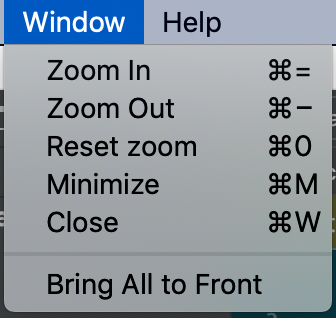
To match with the macOS system conventions, I think that it should be split into three menus: File, View, and Window. I propose adding splitting the menu items in this way:
**File:**
* Close
**View:**
* Actual Size (what is currently labelled "Reset zoom")
* Zoom In
* Zoom Out
**Window:**
* Minimize
* `---`
* Bring All To Front
Note that currently Zoom is in the Window menu and many Mac apps have a Zoom entry in the Window menu. However, this zoom is for 'zooming' the entire window in and out to fill the window, i.e. the same behaviour you get if you Option+Click on the green + button in the corner of any macOS window. The system convention for zooming in and out on application content is for those items to go into the View menu.
I'm not so familiar with the conventions on other platforms, if they are different from this then these settings may need to be conditional on being on macOS.
Contributor guide
No contributing guide indexed for this repository
Research direction
The issue names no files, tests, or entry points. Start by locating the macOS menu construction in the client and compare the current Window menu with the requested File, View, and Window grouping. Done means the listed items appear in the requested menus on macOS while other platforms retain appropriate behavior.
Written by the indexing model from the issue text.
Assessment
- Tech stack
- macos
- Domain
- desktop
- Issue type
- Feature
- Difficulty
- 3/5
- Estimated time
- 1-2 days
- Activity status
- Stale
- Clarity
- Mostly clear
- Newbie friendliness
- 35/100