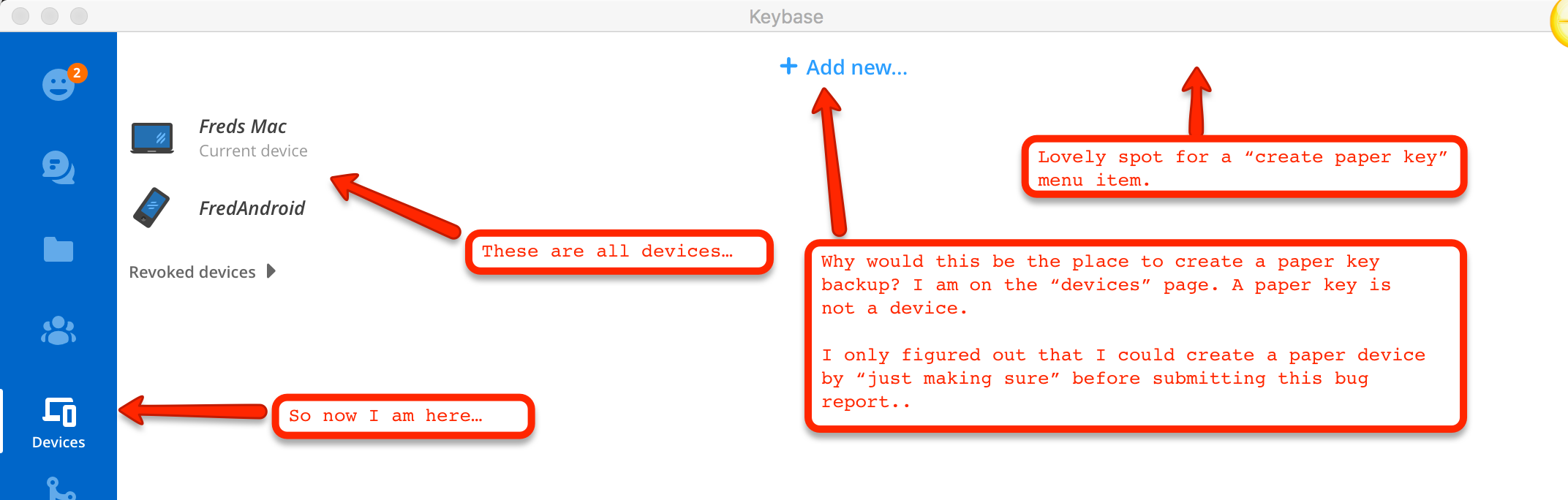
paper key notice takes me to "device page" and not "backup key page"
Nobody has claimed this yet.
- Dominant language
- Go
- Stars
- 9.2k
- Forks
- 1.3k
- Avg merge
- 12h 58m
- Merged PRs (30d)
- 56
Description
Keybase GUI Version: 1.0.40-20180205183337+269845275
This is extremely counter intuitive. A paper backup of my key has nothing to do with my devices. Everything about this interface indicates that clicking the notice has brought me to the wrong place.
I did not click the "add new" button, because I did not want to add a new device. It makes no sense that the paper backup system should be there.

Contributor guide
No contributing guide indexed for this repository
First steps
- Read the whole issue, then the project's contributing guide.
- Comment on the issue to say you are picking it up — it saves two people doing the same work.
- Fork the repository and make your change on a branch.
- Open a pull request that references the issue number.
Research direction
Start by reproducing the paper-key notice flow in the Keybase GUI, following the device page and the “add new” entry point shown in the screenshots. Trace where the notice should lead and confirm that the resulting page clearly presents paper backup keys; done means the notice opens the backup key page rather than the device page.
Written by the indexing model from the issue text.
Assessment
- Domain
- frontend
- Issue type
- Bug
- Difficulty
- 3/5
- Estimated time
- 1-2 days
- Activity status
- Stale
- Clarity
- Mostly clear
- Newbie friendliness
- 35/100