kepler loads scientific notation as a string and not a float [Bug]
- Dominant language
- TypeScript
- Stars
- 12k
- Forks
- 2k
- Avg merge
- 1d 5h
- Merged PRs (30d)
- 66
Description
**Describe the bug**
When importing a GeoJSON or CSV with a field including numbers in scientific notation, kepler reads the field to a string instead of a float.
**To Reproduce**
Steps to reproduce the behavior:
1. Use Excel/Libre Calc to generate a CSV file with a column of numbers to many decimal places (use attached example)
2. Import that CSV into kepler
3. Show the table data and notice the datatype at the top (see attached screenshot)
4. Datatype will be string, not float
**Expected behavior**
Light lift: kepler should recognize scientific notation and use the float datatype to represent the values. This is common practice in data science applications
Heavy lift: ability to specify/convert data types
**Screenshots**
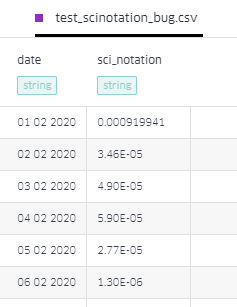
**Example Data**
Note: changed file extension to txt. Change back to csv before loading into kepler
[test_scinotation_bug.csv.txt](https://github.com/keplergl/kepler.gl/files/4865634/test_scinotation_bug.csv.txt)
**Desktop (please complete the following information):**
- OS: Windows 10 Pro 64 bit
- Browser: Chrome 83.0.4103.116
**Additional context**
Add any other context about the problem here.
Contributor guide
No contributing guide indexed for this repository
Research direction
Start by reproducing the import with the attached CSV example, then trace the CSV and GeoJSON field type inference used by the table view. The issue is done when scientific-notation values are recognized as floats rather than strings, with coverage for the reported input.
Written by the indexing model from the issue text.
Assessment
- Domain
- data-visualization
- Issue type
- Bug
- Difficulty
- 3/5
- Estimated time
- 1-2 days
- Activity status
- Stale
- Clarity
- Mostly clear
- Newbie friendliness
- 45/100