Command palette selection highlight nearly invisible
- Dominant language
- Jupyter Notebook
- Stars
- 13.3k
- Forks
- 5.8k
- Avg merge
- 6d 11h
- Merged PRs (30d)
- 7
Description
The command palette selection highlight is nearly invisible which makes it hard to see which item is active. In the screenshot below the "change cell to heading 2" item should have a high-contrast background but doesn't (its background is #f5f5f5 which is very close to the white background). I thought this was a regression but rolling the `notebook` package back did not help.
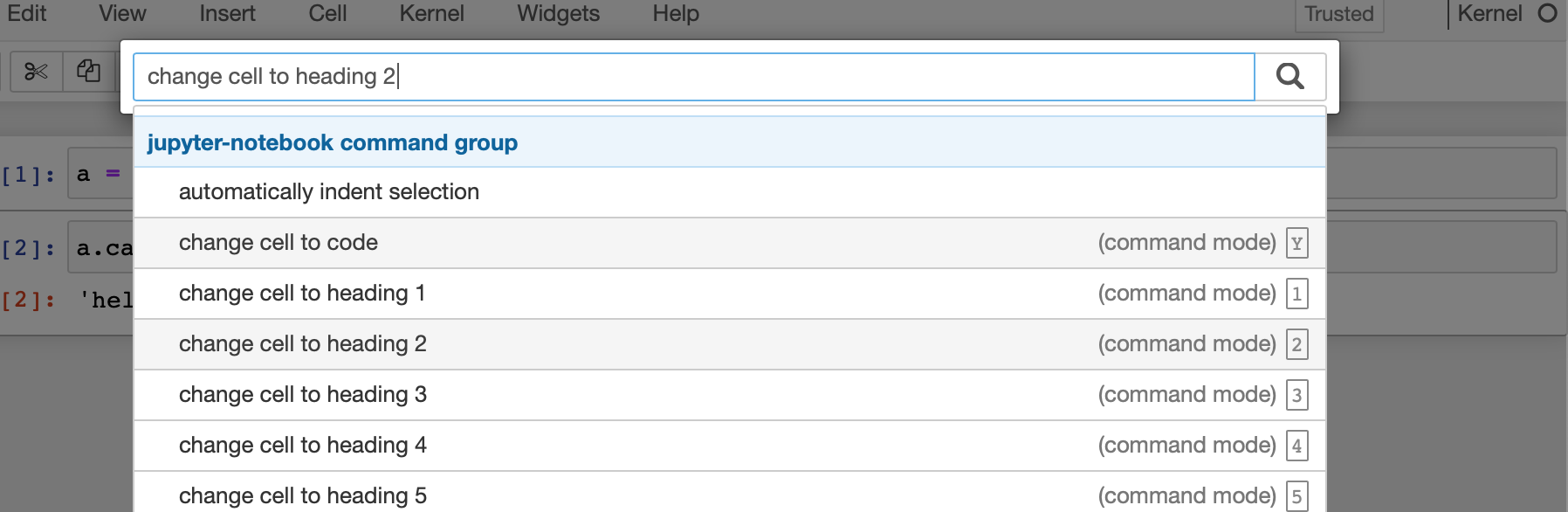
In case someone else runs into this a workaround is to put a following rule into the local custom.css:
```
.active>a {
background-color: orange !important;
}
```
Tested in Safari and Firefox on macOS 10.14.
Contributor guide
Research direction
Reproduce the command palette in Safari or Firefox on macOS 10.14 and inspect the .active>a styling, using the screenshot and custom.css workaround as references. Trace the command palette styles in the notebook package; done means the active item has a clearly visible high-contrast highlight without requiring local custom.css.
Written by the indexing model from the issue text.
Assessment
- Tech stack
- css, jupyter-notebook
- Domain
- accessibility, frontend
- Issue type
- Bug
- Difficulty
- 3/5
- Estimated time
- 1-2 days
- Activity status
- Stale
- Clarity
- Mostly clear
- Newbie friendliness
- 35/100