[docs] Wide images are cut off in the PDF version of the docs
- Dominant language
- Jupyter Notebook
- Stars
- 13.3k
- Forks
- 5.8k
- Avg merge
- 6d 11h
- Merged PRs (30d)
- 7
Description
Like all Jupyter projects, I am extremely impressed with the quality of the docs here in jupyter/notebook. Thanks so much to all of the contributors of these docs. They really truly are top-notch.
While reading the PDF version of the jupyter/notebook RTD docs, I noticed that the in-lined images go off the side of the page, as you can see in this attached screenshot:
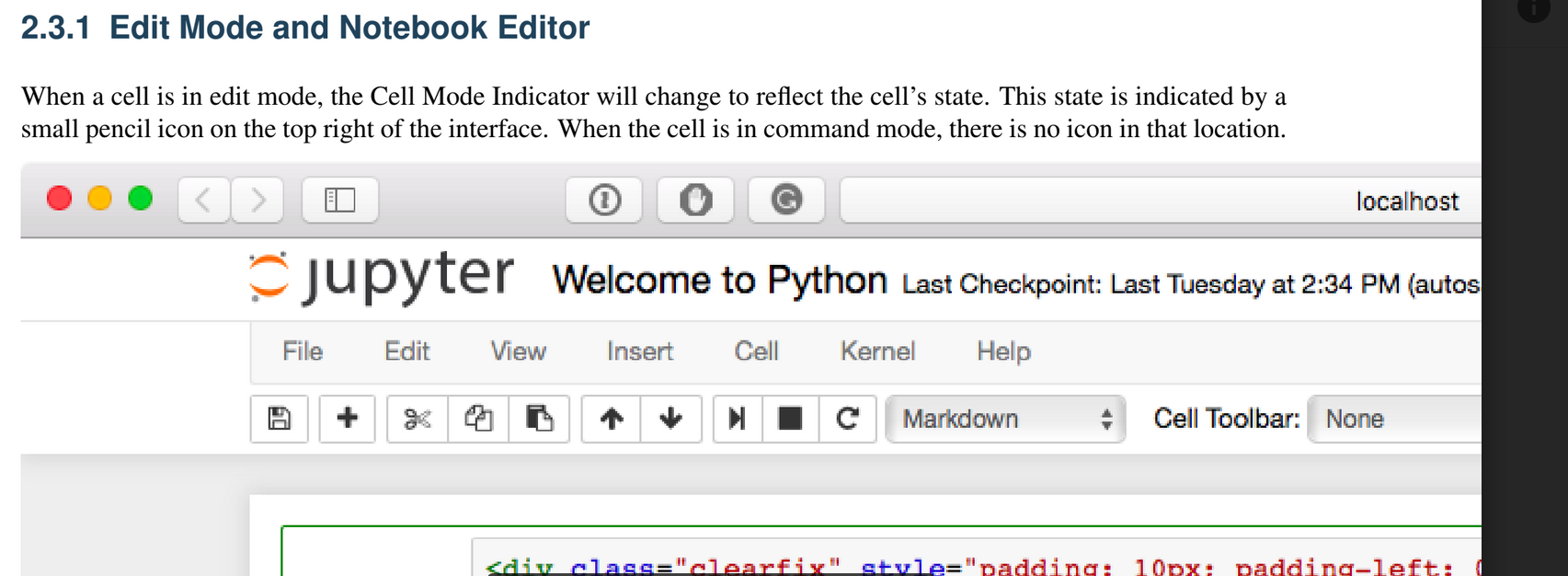
Compare this above image to [what you see on RTD](https://jupyter-notebook.readthedocs.io/en/stable/ui_components.html#edit-mode-and-notebook-editor):

Contributor guide
Research direction
Start by reproducing the PDF version of the documentation and compare the inline images on the RTD ui_components.html page with their PDF rendering. Trace the documentation build or PDF entry point responsible for image sizing, then confirm that wide images fit within the PDF page without being cut off.
Written by the indexing model from the issue text.
Assessment
- Tech stack
- jupyter-notebook
- Domain
- documentation
- Issue type
- Bug
- Difficulty
- 3/5
- Estimated time
- 1-2 days
- Activity status
- Stale
- Clarity
- Mostly clear
- Newbie friendliness
- 35/100