Buttons don't show up properly in Sphinx docs
- Dominant language
- Jupyter Notebook
- Stars
- 13.3k
- Forks
- 5.8k
- Avg merge
- 6d 11h
- Merged PRs (30d)
- 7
Description
Some example notebooks include buttons to refer to toolbar buttons in the notebook UI. These don't look right, or even have the icon, in the Sphinx docs:
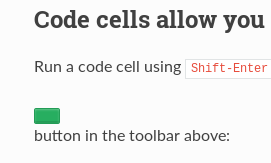
https://jupyter-notebook.readthedocs.io/en/latest/examples/Notebook/Running%20Code.html
Contributor guide
Research direction
Open the linked Running Code page and compare its rendered toolbar-button references with the example notebooks mentioned in the issue and the attached screenshot. Trace how Sphinx renders those buttons and determine what is missing from the documentation output. Done means the affected buttons display correctly, including their icons, in the linked Sphinx page.
Written by the indexing model from the issue text.
Assessment
- Tech stack
- jupyter-notebook
- Domain
- documentation
- Issue type
- Bug
- Difficulty
- 3/5
- Estimated time
- 1-2 days
- Activity status
- Stale
- Clarity
- Mostly clear
- Newbie friendliness
- 35/100