Problem to Import wradlib in jupyter notebook
- Dominant language
- Jupyter Notebook
- Stars
- 13.3k
- Forks
- 5.8k
- Avg merge
- 6d 11h
- Merged PRs (30d)
- 7
Description
Hello,
I installed recently anaconda and jupeter notebook in my computer (windows 7, 64bit). Evry thinks work good, but the problem is when i want to import a library wradlib in jupyter notebook, it's give me a message error **ModuleNotFoundError: No module named 'wradlib'**. Otherwise when i import wradlin in command anaconda prompt it works fine. You find below some test to resolve this problem, but without any result:
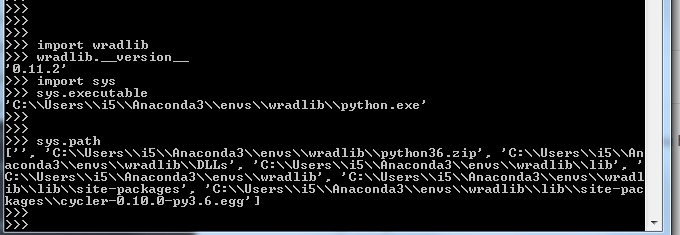

Please help me to solve this problem.
Contributor guide
Research direction
Start by reproducing the import failure in the reported Anaconda and Jupyter Notebook setup on Windows 7, comparing the environment used by the Anaconda prompt with the notebook kernel. Use the reported ModuleNotFoundError and screenshots to determine whether the issue is specific to the kernel environment. Done means identifying a reproducible notebook-side cause and documenting a verified resolution.
Written by the indexing model from the issue text.
Assessment
- Tech stack
- anaconda, jupyter-notebook, python
- Domain
- tooling
- Issue type
- Bug
- Difficulty
- 4/5
- Estimated time
- 3-5 days
- Activity status
- Stale
- Clarity
- Needs clarification
- Newbie friendliness
- 20/100