No (Obvious) way to create named terminals
Open
- Dominant language
- Jupyter Notebook
- Stars
- 13.3k
- Forks
- 5.8k
- Avg merge
- 6d 11h
- Merged PRs (30d)
- 7
Description
Jupyter notebook supports naming the terminals:
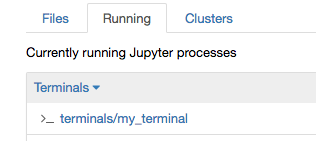
however there seems to be no UI to either set the terminal name or to rename the terminal once it has been created. The only way I have found to create a named terminal is to browse to: `http:///terminals/`. By default the create new terminal menu creates numbered terminals:
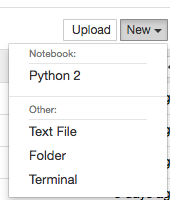
Further, on the terminal page itself, there is no way to see the terminal name other than to look at the location bar.
Contributor guide
Assessment
This issue has not been assessed yet.