jspreadsheet / jspreadsheet/ce
Bug: onSelection not selecting row and col correctly after reinitialising the table.
Nobody has claimed this yet.
- Dominant language
- JavaScript
- Stars
- 7.2k
- Forks
- 890
- PR merge metrics
- No merged PRs in 30d
Description
I am using the plugin with the REACT. As per my requirement, I have to reinitialise the table once there is a change in data or column structure (we have the 'Hide Column' feature on our screen). The options object looks like follows,
let options = {
    tableOverflow: true,
    tableWidth: '100%',
    tableHeight: 'auto',
    wordWrap: true,
    freezeColumns: 2,
    minDimensions: displayType === 'quarterly' ? [18, 1] : [50, 1],
    contextMenu: () => [],
    data: data,
    columns: [],
    nestedHeader: [],
    updateTable: (
      instance: any,
      cell: HTMLDivElement,
      col: number,
      row: number,
      val: string,
      label: string,
      cellName: string
    ) => {},
    onchange: (
      instance: any,
      cell: HTMLDivElement,
      col: number,
      row: number,
      value: string
    ) => {},
    onselection: (cell: HTMLDivElement, col: number, row: number) => {
      setSelectedColAndRow(col, row); // React event handler function
    },
  };
Within the above object the value of data and nestedHeader keep on changing based on user option selection. To accommodate this in my component I have written following.
componentDidUpdate(prevProps: ExcelTableProps, prevState: ExcelTableState) {
    if (
      !isEqual(
        this.state.options,
        prevState.options
      )
    ) {
      this.wrapper.current.innerHTML = '';
      this.tableEle = jexcel(this.wrapper.current, this.state.options);
    }
  }
Once this is executed the onSelection event doesn't behave correctly. On first time selection; after re-initialization, the selected row and col always return 0,0. Also, the event fires multiple times even if we click only once. Due to these multiple executions of event, the reference to the selected cell gets lost. In the below image, the selection was 7th row and 1st col, which was recorded but later the selection event fired a couple of times resetting the selected value to 0,0 position
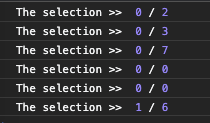
After clicking the second time it starts recording the correct value.
Contributor guide
First steps
- Read the whole issue, then the project's contributing guide.
- Comment on the issue to say you are picking it up — it saves two people doing the same work.
- Fork the repository and make your change on a branch.
- Open a pull request that references the issue number.
Research direction
Start from the React componentDidUpdate reinitialization path and the jexcel onselection callback shown in the issue. Reproduce a data or nestedHeader change, then verify that the first selection reports the clicked row and column and that one click produces only one selection event.
Written by the indexing model from the issue text.
Assessment
- Tech stack
- javascript
- Domain
- frontend
- Issue type
- Bug
- Difficulty
- 4/5
- Estimated time
- 3-5 days
- Activity status
- Stale
- Clarity
- Mostly clear
- Newbie friendliness
- 25/100