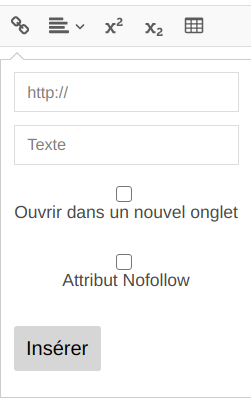
deactivate the no follow attribute checkbox
Open
Nobody has claimed this yet.
- Dominant language
- TypeScript
- Stars
- 406
- Forks
- 131
- Avg merge
- 2h 32m
- Merged PRs (30d)
- 2
Description
Hi , I would like to deactivate the no follow attribute visible when I click on the pop-up to add a link, I refer to this but how do I set it up on react?
https://github.com/xdan/jodit/issues/68
I just tried to put it in the config but nothing
Contributor guide
No contributing guide indexed for this repository
First steps
- Read the whole issue, then the project's contributing guide.
- Comment on the issue to say you are picking it up — it saves two people doing the same work.
- Fork the repository and make your change on a branch.
- Open a pull request that references the issue number.
Research direction
Start by reading the referenced Jodit issue #68 and inspect how the React wrapper passes editor configuration to the link pop-up. Confirm whether the no-follow checkbox can be disabled through the wrapper configuration, then verify that the checkbox is no longer visible when adding a link.
Written by the indexing model from the issue text.
Assessment
- Tech stack
- react, typescript
- Domain
- frontend
- Issue type
- Feature
- Difficulty
- 3/5
- Estimated time
- 1-2 days
- Activity status
- Stale
- Clarity
- Mostly clear
- Newbie friendliness
- 30/100