QA Publish (Publish Full Two) - Add "tool tip" + icon change for hover on "Select Share Option"
Open
@MendyBerger is already working on this.
Since Aug 13, 2021.
frontend - visual
med
- Dominant language
- Rust
- Stars
- 14
- Forks
- 18
- PR merge metrics
- No merged PRs in 30d
Description
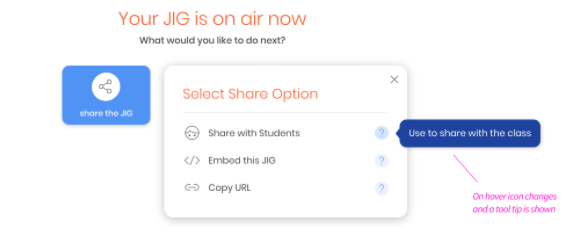
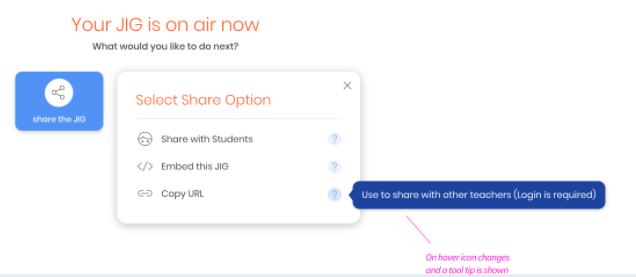
Zeplin sketches indicate that hovering over an option in "Select Share Option" dropdown list should produce the following responses:
- tool tip
"Share with Students" --> "Use to share with the class"
"Embed this JIG" --> "Use to show preview in another website"
"Copy URL" --> "Use to share with other teachers (Login is required)" - icon change (question mark icon becomes darker?)
Current Storybook screen does not reflect this interaction.
Please add "tool tip" + icon change responses for hover on "Select Share Option".
Zeplin Sketch ("Share with Students" --> "Use to share with the class"):
Zeplin Sketch ("Embed this JIG" --> "Use to play within another website"):

Zeplin Sketch ("Copy URL" --> "Use to share with other teachers (Login is required)"):
Storybook Screen (missing responses):

Contributor guide
No contributing guide indexed for this repository
First steps
- Read the whole issue, then the project's contributing guide.
- Comment on the issue to say you are picking it up — it saves two people doing the same work.
- Fork the repository and make your change on a branch.
- Open a pull request that references the issue number.
Assessment
This issue has not been assessed yet.