Don't allow covers showing default 'Shalom' text - rather have defaults
Open
@MendyBerger is already working on this.
Since Apr 5, 2023.
Content: Search results
Creator-general
Playlists (was Courses)
Resources
- Dominant language
- Rust
- Stars
- 14
- Forks
- 18
- PR merge metrics
- No merged PRs in 30d
Description
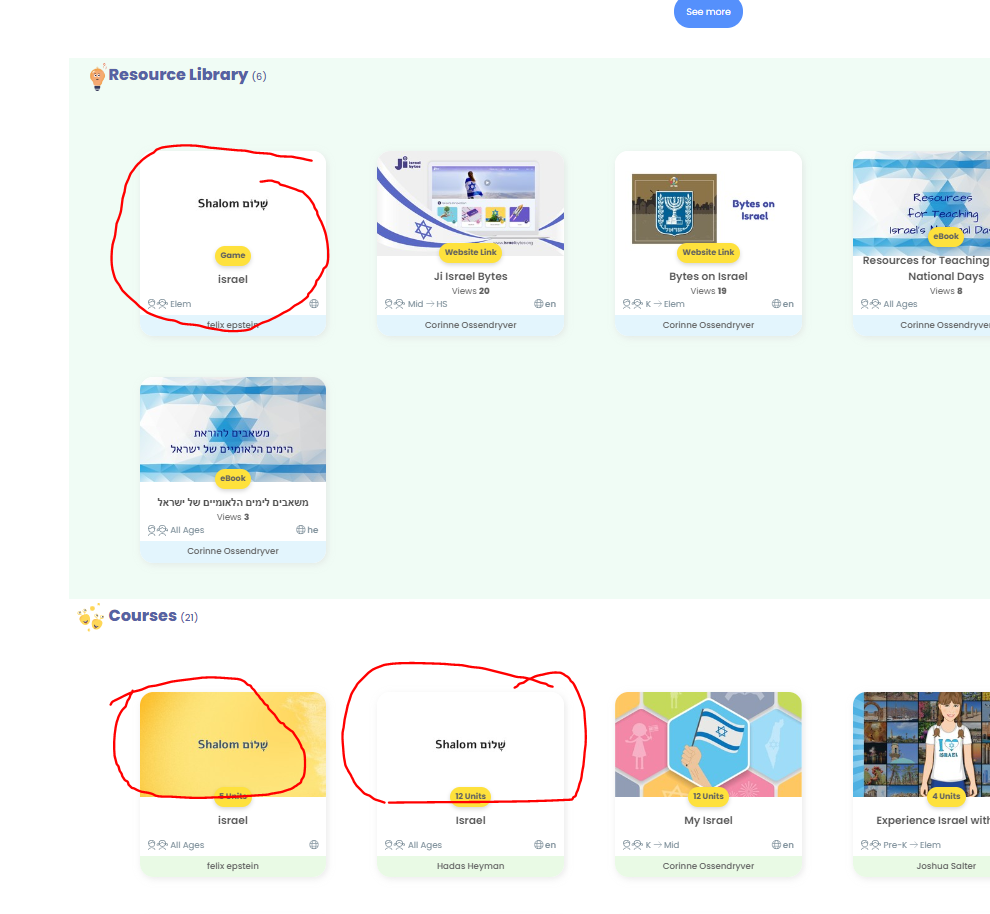
As teachers are creating and uploading resources, we are getting more and more that look like this:
Suggested solution:
- JIGs: At the moment, if you don't drag in a cover, the cover becomes the thumbnail of the first module. This is good. But if the teacher drags in the cover, and does not design it, then the default cover becomes the SHALOM text on either white background or background of the theme. I suggest to detect whether the cover has been edited at all. If not, then use the thumbnail of the first module.
- Courses: If the thumbnail has not been edited, use the thumbnail of the first JIG in the course as the default.
- Resources: If the thumbnail has not been edited, then replace the SHALOM text with the name of the resource, and change the background to color RGB c4d9f7. Gali had wanted the thumbnail as in #3565, but I think instead of having the svg saying "My resource", it will be much better to have the name of the resource as the thumbnail.
Contributor guide
No contributing guide indexed for this repository
First steps
- Read the whole issue, then the project's contributing guide.
- Comment on the issue to say you are picking it up — it saves two people doing the same work.
- Fork the repository and make your change on a branch.
- Open a pull request that references the issue number.
Assessment
This issue has not been assessed yet.