When clicking "Upload a file" in audio tab when editing a card game, existing audio is removed
Open
@corinnewo is already working on this.
Since Sep 1, 2022.
Activities: All card games
bug
- Dominant language
- Rust
- Stars
- 14
- Forks
- 18
- PR merge metrics
- No merged PRs in 30d
Description
Describe the bug
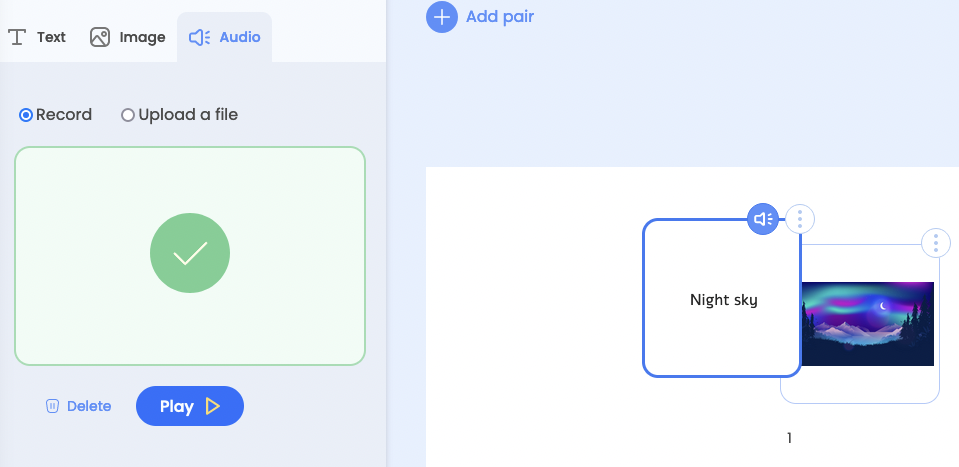
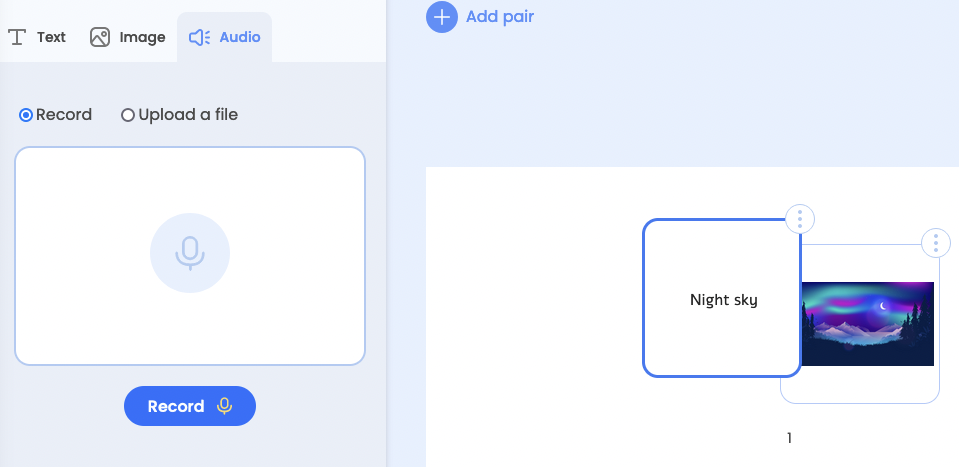
When clicking "Upload a file" in audio tab when editing a card game, existing audio is removed without prompting the teacher if they want to remove it.
To Reproduce
Steps to reproduce the behavior:
- Create a card game and add audio to a card;
- Once audio is saved on the card, click the "Upload a file" button;
- Note that the uploaded audio is removed, and you need to click "Upload a file" again to switch to the upload view.
Expected behavior
The teacher should be prompted if they want to remove the existing audio, if there is audio. Otherwise, they should be able to switch without a prompt.
Screenshots
Audio recorded and saved
Clicked "Upload a file"
Contributor guide
No contributing guide indexed for this repository
First steps
- Read the whole issue, then the project's contributing guide.
- Comment on the issue to say you are picking it up — it saves two people doing the same work.
- Fork the repository and make your change on a branch.
- Open a pull request that references the issue number.
Assessment
This issue has not been assessed yet.