jesseduffield / jesseduffield/lazygit
Skip remote selection in the Remotes tab when there is only one remote
- Dominant language
- Go
- Stars
- 82.4k
- Forks
- 3k
- Avg merge
- 2d 18h
- Merged PRs (30d)
- 19
Description
**Is your feature request related to a problem? Please describe.**
Feature request: Show the list of remote branches in the Remotes tab without having to select the remote first when there is only one remote.
Currently, to see the list of remote branches the user has to:
1. Navigate to the Branches panel
2. Navigate to the Remotes tab
3. Select the remote
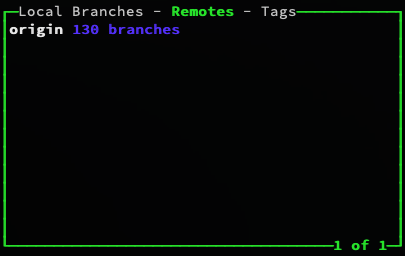
Step 3 is pointless when there is only one remote. A common use case is that there is only `origin`.
**Describe the solution you'd like**
Do not show the list of remotes in the Remotes tab when there is only one remote but show the list of branches in that remote instead.
**Describe alternatives you've considered**
An alternative could be that the tab remembers the remote selection after the first time. Currently, it resets every time user leaves the tab which is quite annoying.
**Additional context**
This is what the user sees currently when navigating to the Remotes tab:
Contributor guide
Assessment
This issue has not been assessed yet.