jesseduffield / jesseduffield/lazydocker
lazydocker running in git-bash via Windows Terminal, but not inside standalone git-bash
- Dominant language
- Go
- Stars
- 52.8k
- Forks
- 1.7k
- PR merge metrics
- No merged PRs in 30d
Description
**Describe the bug**
When trying to run lazydocker inside a standalone git-bash shell,
through `./lazydocker.exe`, then nothing happens (no error and also no new input is possible, compare this with the screenshot). on the other side, then git-bash is used within Windows Terminal,
then lazydocker can be run via `./lazydocker.exe` or `lazydocker` and will also start inside this embedded git-bash shell.
**To Reproduce**
1. Download the archive with the 64-bit Windows binary of lazydocker with version 0.18.1, e.g. into your Desktop folder.
2. Unpack the archive so that the executable is in your Desktop folder.
3. Go into the Desktop directory from within a standalone git-bash shell.
4. Run the command `./lazydocker.exe`.
**Expected behaviour**
After step 4 lazydocker should start from within the standalone git-bash shell,
as it does when git-bash is used inside Windows Terminal.
**Screenshot**
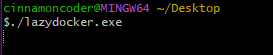
**Additional context**
When I stubled upon this problem, I used a workaround, by starting lazydocker from within git-bash with powershell. The downside of this workaround is, that a new powershell window pops up in addition to the current git-bash shell.
Later, thanks to a colleague, I found out, that lazydocker runs from within git-bash, if git-bash is used inside Windows Terminal (as described above). So this might also be a workaround, but would require the user to setup and use Windows Terminal.
Thanks in advance for reading and especially for creating lazydocker : )
Contributor guide
Assessment
This issue has not been assessed yet.