jesseduffield / jesseduffield/lazydocker
Breaks with Linux Docker Desktop
- Dominant language
- Go
- Stars
- 52.8k
- Forks
- 1.7k
- PR merge metrics
- No merged PRs in 30d
Description
**Describe the bug**
Running Docker Desktop on Linux lazydocker can see a service but shows no container.
**To Reproduce**
Steps to reproduce the behavior:
1. Install Docker Desktop for linux.
2. Run a docke-compose build
3. Check service status
4. See "No Container" under the Logs/stats/Container Env/Container Config/Top sections
**Expected behaviour**
The same info as with docker.io
**Screenshots**
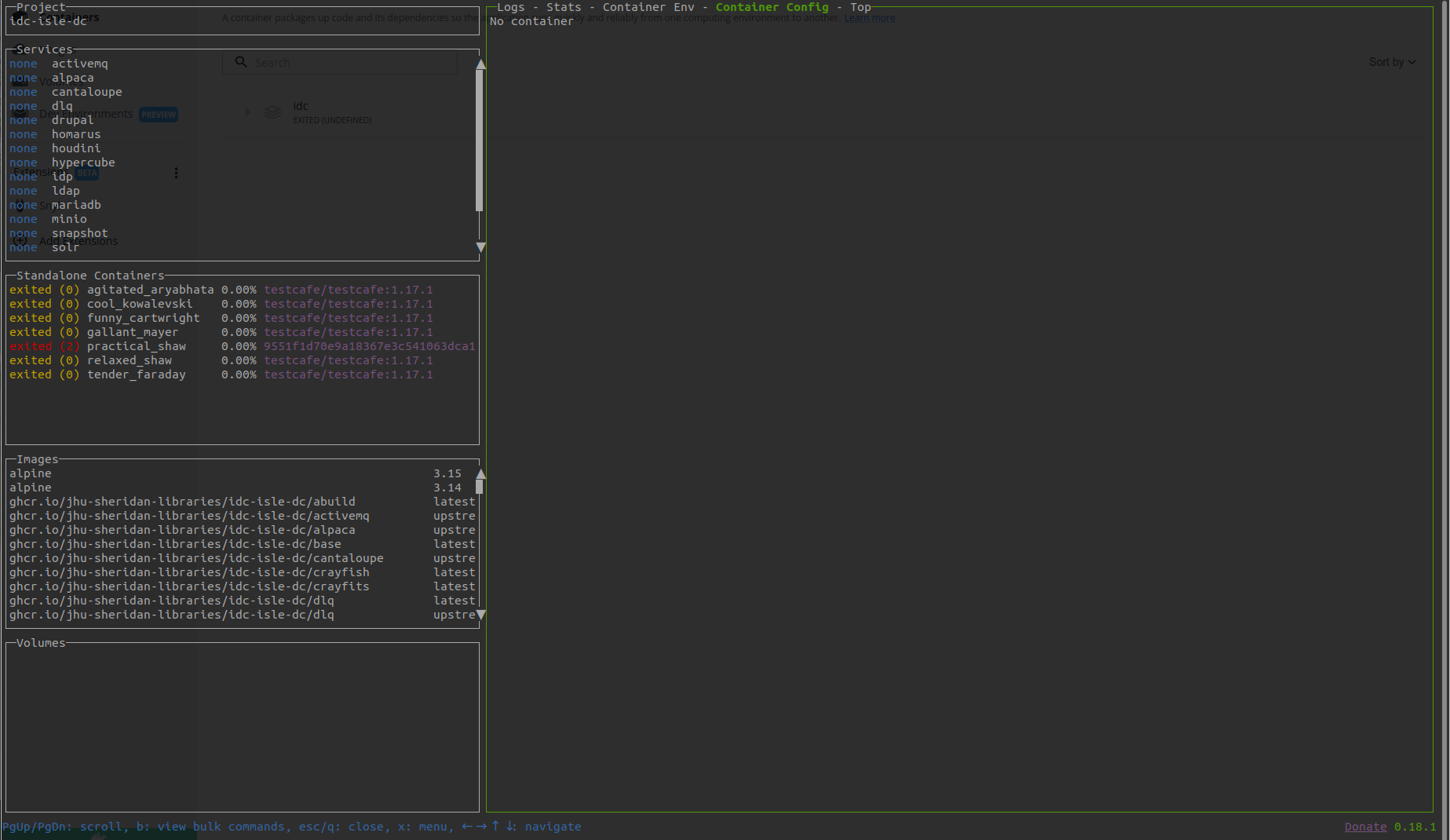
**Desktop (please complete the following information):**
- OS: Ubuntu 22.04
- Lazydocker Version 0.18.1
- Used asdf to install
- Docker Desktop 4.8.2
- Docker version 20.10.16 (installed by docker desktop)
**Additional context**
The docker repo I'm building if you want the same complexity for testing is this. To build after cloning you run `make up` and 'y' to automatically generate secrets (password for Drupal install). https://github.com/Islandora-Devops/isle-dc
I had previously had docker installed the traditional way.
Contributor guide
Assessment
This issue has not been assessed yet.