jenkinsci / jenkinsci/htmlpublisher-plugin
[JENKINS-75769] HTML Publisher Plugin not rendering CSS/JS in HTML reports after recent Jenkins update
- Dominant language
- Java
- Stars
- 89
- Forks
- 143
- PR merge metrics
- No merged PRs in 30d
Description
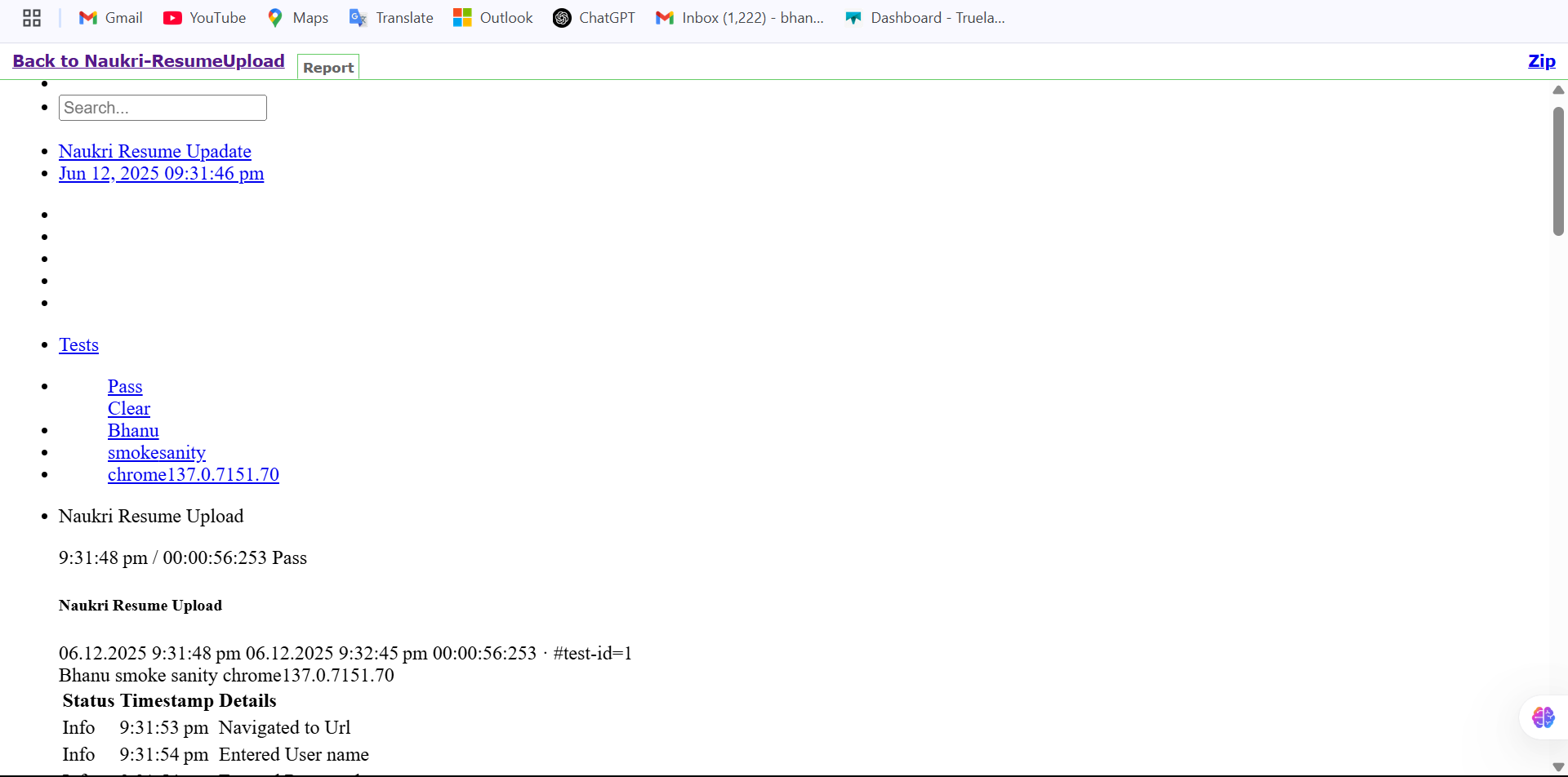
After a recent update to Jenkins, HTML reports published using the HTML Publisher Plugin are not rendering properly. The `report.html` file opens, but associated CSS and JavaScript files are not applied, resulting in a plain-text or unstructured view.

Previously, the same configuration displayed well-formatted reports. The ExtentReports folder includes subfolders (css, js, media), and the plugin is correctly configured with:
- Directory: ExtentReports/
- Index: report.html
We suspect that CSP or Jenkins core behavior might have changed and is now blocking JS/CSS.
Steps to reproduce:
1. Configure HTML Publisher Plugin with ExtentReports folder
2. Trigger a test run that generates the report
3. Open published `report.html` from Jenkins sidebar
Expected:
- Fully styled report with all assets loaded
Actual:
- HTML loads without CSS or JS, making the report unreadable
This is impacting automation visibility and report sharing. Please advise or suggest a workaround if it's a security change.
Screenshots attached.
---
Originally reported by bhanu9515, imported from: HTML Publisher Plugin not rendering CSS/JS in HTML reports after recent Jenkins update
Raw content of original issue
After a recent update to Jenkins, HTML reports published using the HTML Publisher Plugin are not rendering properly. The `report.html` file opens, but associated CSS and JavaScript files are not applied, resulting in a plain-text or unstructured view.
Previously, the same configuration displayed well-formatted reports. The ExtentReports folder includes subfolders (css, js, media), and the plugin is correctly configured with:
- Directory: ExtentReports/
- Index: report.html
We suspect that CSP or Jenkins core behavior might have changed and is now blocking JS/CSS.
Steps to reproduce:
1. Configure HTML Publisher Plugin with ExtentReports folder
2. Trigger a test run that generates the report
3. Open published `report.html` from Jenkins sidebar
Expected:
- Fully styled report with all assets loaded
Actual:
- HTML loads without CSS or JS, making the report unreadable
This is impacting automation visibility and report sharing. Please advise or suggest a workaround if it's a security change.
Screenshots attached.
1 attachment
- [Screenshot (42).png](https://issues.jenkins.io/secure/attachment/64508/Screenshot%20%2842%29.png)
> 
Contributor guide
Research direction
Start by reproducing the issue with an ExtentReports folder containing report.html and its css, js, and media subfolders, then inspect how the published report is served from the Jenkins sidebar. Done means the published report loads its CSS and JavaScript and is fully styled after a Jenkins update.
Written by the indexing model from the issue text.
Assessment
- Tech stack
- java
- Domain
- devops
- Issue type
- Bug
- Difficulty
- 4/5
- Estimated time
- 3-5 days
- Activity status
- Stale
- Clarity
- Mostly clear
- Newbie friendliness
- 35/100