jenkinsci / jenkinsci/git-client-plugin
[JENKINS-75812] Misleading label on git client plugin configuration page
- Dominant language
- Java
- Stars
- 152
- Forks
- 402
- Avg merge
- 6h 47m
- Merged PRs (30d)
- 4
Description
### Reproduction Steps
1. Configure Global Tool():
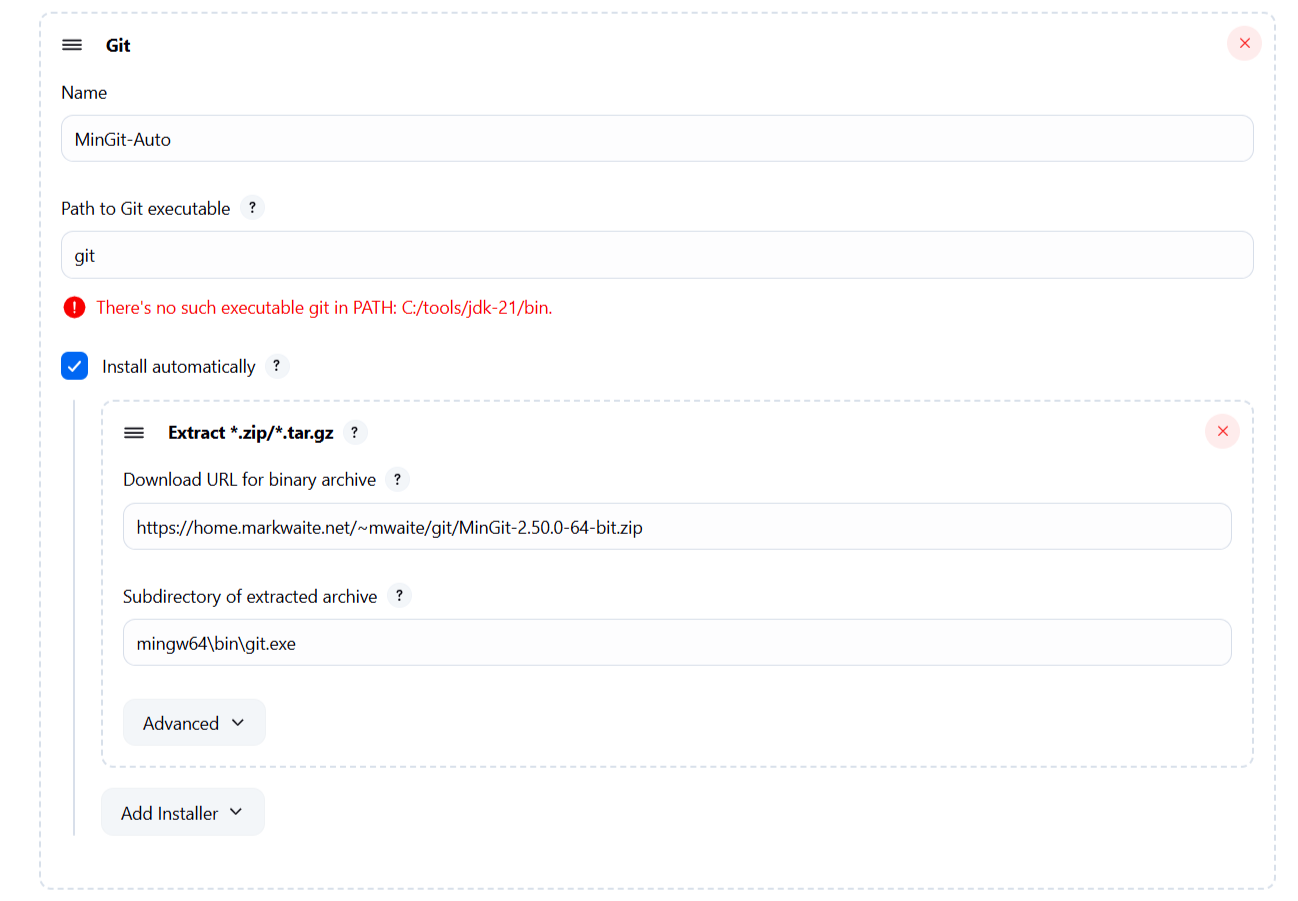
- Name: `MinGit-Auto`
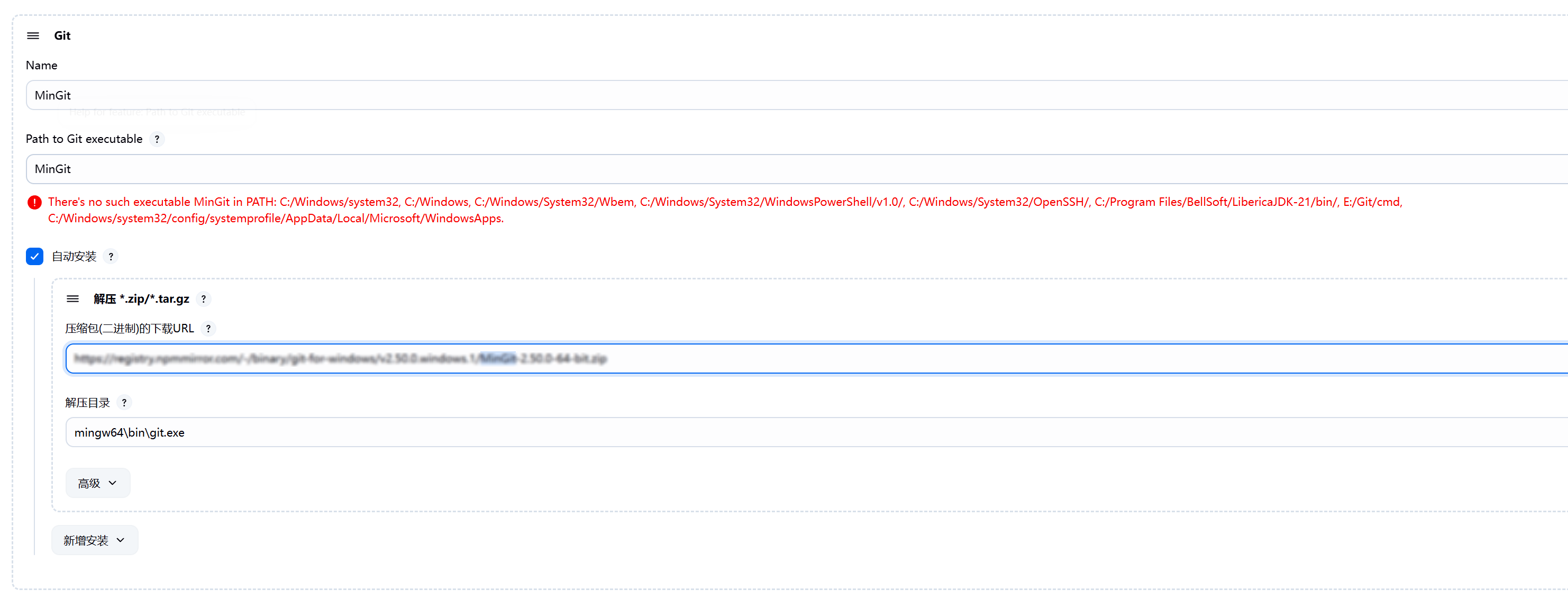
- Set "Path to Git executable": `mingw64\bin\git.exe`
- Check "Install automatically(.zip/.tar.gz)"
- Select "MinGit" installer Url
- Set "Subdirectory": `MinGit`
2. Create pipeline job:
groovy

   pipeline {

     agent any

     tools { git 'MinGit-Auto' }

     stages {

       stage('Clone') {

         steps {

           git url: 'http://example.com/repo.git'

         }

       }

     }

   }
3. Run job :
logs:
*Started by user Admin

Running as SYSTEM

Building remotely on [Agent_IP] (windows) in workspace $WORKSPACE_PATH

[WS-CLEANUP] Deleting project workspace...

[WS-CLEANUP] Done

Unpacking https://example.com/git/MinGit-2.50.0-64-bit.zip to $JENKINS_HOME/tools/mingw64/bin/git.exe on [Agent_IP]

The recommended git tool is: NONE

using credential Jenkins

Cloning the remote Git repository

Cloning repository http://example.com/repository.git

 > $JENKINS_HOME/tools/mingw64/bin/git.exe\MinGit init $WORKSPACE_PATH # timeout=10

ERROR: Error cloning remote repo 'origin'

hudson.plugins.git.GitException: Could not init $WORKSPACE_PATH

    ...

Caused by: hudson.plugins.git.GitException: Error performing git command: $JENKINS_HOME/tools/mingw64/bin/git.exe\MinGit init $WORKSPACE_PATH

    ...

Caused by: java.io.IOException: Cannot run program "$JENKINS_HOME/tools/mingw64/bin/git.exe\MinGit" (in directory "$WORKSPACE_PATH"): CreateProcess error=2, 系统找不到指定的文件。

    ...

Caused by: java.io.IOException: CreateProcess error=2, 系统找不到指定的文件。

    ...

ERROR: Error cloning remote repo 'origin'

Finished: FAILURE*
### Expected Behavior
1. MinGit installs to:
`$JENKINS_HOME/tools/mingw64/bin/git.exe`
2. Repository clones to:
`$WORKSPACE/`
### Actual Behavior
Path reversal occurs:
1. Git executable path becomes invalid:
`$JENKINS_HOME/tools/mingw64/bin/git.exe\MinGit`
2. Repository initialization targets workspace path
3. Result: `java.io.IOException: CreateProcess error=2` (文件找不到)
---
Originally reported by  paeryu, imported from: Misleading label on git client plugin configuration page
Raw content of original issue
### Reproduction Steps
1. Configure Global Tool():
- Name: `MinGit-Auto`
- Set "Path to Git executable": `mingw64\bin\git.exe`
- Check "Install automatically(.zip/.tar.gz)"
- Select "MinGit" installer Url
- Set "Subdirectory": `MinGit`
2. Create pipeline job:groovy
pipeline {
agent any
tools { git 'MinGit-Auto' }
stages {
stage('Clone') {
steps {
git url: 'http://example.com/repo.git'
}
}
}
}
3. Run job :
logs:
*Started by user Admin
Running as SYSTEM
Building remotely on [Agent_IP] (windows) in workspace $WORKSPACE_PATH
[WS-CLEANUP] Deleting project workspace...
[WS-CLEANUP] Done
Unpacking https://example.com/git/MinGit-2.50.0-64-bit.zip to $JENKINS_HOME/tools/mingw64/bin/git.exe on [Agent_IP]
The recommended git tool is: NONE
using credential Jenkins
Cloning the remote Git repository
Cloning repository http://example.com/repository.git
> $JENKINS_HOME/tools/mingw64/bin/git.exe\MinGit init $WORKSPACE_PATH # timeout=10
ERROR: Error cloning remote repo 'origin'
hudson.plugins.git.GitException: Could not init $WORKSPACE_PATH
...
Caused by: hudson.plugins.git.GitException: Error performing git command: $JENKINS_HOME/tools/mingw64/bin/git.exe\MinGit init $WORKSPACE_PATH
...
Caused by: java.io.IOException: Cannot run program "$JENKINS_HOME/tools/mingw64/bin/git.exe\MinGit" (in directory "$WORKSPACE_PATH"): CreateProcess error=2, 系统找不到指定的文件。
...
Caused by: java.io.IOException: CreateProcess error=2, 系统找不到指定的文件。
...
ERROR: Error cloning remote repo 'origin'
Finished: FAILURE*### Expected Behavior
1. MinGit installs to:
`$JENKINS_HOME/tools/mingw64/bin/git.exe`
2. Repository clones to:
`$WORKSPACE/<job_name>`### Actual Behavior
Path reversal occurs:
1. Git executable path becomes invalid:
`$JENKINS_HOME/tools/mingw64/bin/git.exe\MinGit`
2. Repository initialization targets workspace path
3. Result: `java.io.IOException: CreateProcess error=2` (文件找不到)
environment
```
Jenkins: 2.504.2
OS: Windows Server 2022 - 10.0
Java: 21.0.7 - BellSoft (OpenJDK 64-Bit Server VM)
---
git:5.7.0
git-client:6.1.3
```
3 attachments
- [Snipaste_2025-06-25_18-50-59.png](https://issues.jenkins.io/secure/attachment/64566/Snipaste_2025-06-25_18-50-59.png)
> 
- [image-2025-06-27-13-39-42-608.png](https://issues.jenkins.io/secure/attachment/64578/image-2025-06-27-13-39-42-608.png)
> 
- [mingit-config-screen.png](https://issues.jenkins.io/secure/attachment/64577/mingit-config-screen.png)
> 
Contributor guide
Assessment
This issue has not been assessed yet.