jd-opensource / jd-opensource/taro-ui
AtImagePicker onChange 的 files 在 H5 中返回的是 Object 类型。
- Dominant language
- TypeScript
- Stars
- 4.7k
- Forks
- 740
- PR merge metrics
- No merged PRs in 30d
Description
**问题描述**
AtImagePicker onChange 的 files 在 H5 中返回的是 Object 类型。
导致:
Taro.uploadFile上传图片,小程序上传正常。H5上传时图片后缀不见了。

后台获取不到文件名称。
**复现步骤**
[复现问题的步骤]
1. 使用Taro UI 的 AtImagePicker 上传图片
```js
import Taro, { Component } from '@tarojs/taro'
import { AtImagePicker } from 'taro-ui'
import './index.styl'
import './index.scss'
export default class Index extends Component {
state = {
files: []
}
onChangeImgFile(files, operationType) {
if (operationType === 'add') {
const file = files[files.length - 1]
Taro.uploadFile({
url: ``,
filePath: file.url,
name: 'file',
formData: {
file: files
},
})
}
}
render() {
return (
)
}
}
```
**期望行为**
AtImagePicker 的 onChange 在 H5 中返回 File 类型。
**系统信息**
>
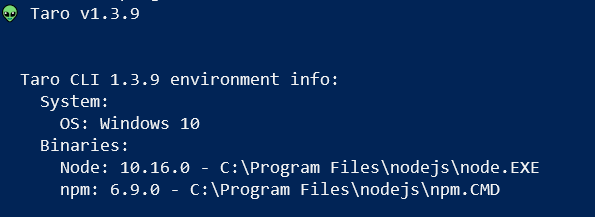
- 操作系统: [e.g. Windows 10]
- Taro 版本 [e.g. v.1.2.9]
- Node.js 版本 [e.g. v10.16.0]
- 报错平台 [h5 ]
Contributor guide
Research direction
No source file or test is named. Start with AtImagePicker's onChange handling for the H5 add-file path, then compare the returned value with the File type expected by the report and reproduce the Taro.uploadFile example. Done means H5 returns a File-compatible value with the filename or extension preserved, without breaking the existing mini-program behavior.
Written by the indexing model from the issue text.
Assessment
- Tech stack
- javascript
- Domain
- frontend
- Issue type
- Bug
- Difficulty
- 3/5
- Estimated time
- 1-2 days
- Activity status
- Quiet
- Clarity
- Mostly clear
- Newbie friendliness
- 48/100