How to run Color Map Optimization pipeline successfully with our custom mesh?
- Dominant language
- C++
- Stars
- 14k
- Forks
- 2.6k
- Avg merge
- 5d 18h
- Merged PRs (30d)
- 6
Description
### Checklist
- [X] I have searched for [similar issues](https://github.com/isl-org/Open3D/issues).
- [X] For Python issues, I have tested with the [latest development wheel](http://www.open3d.org/docs/latest/getting_started.html#development-version-pip).
- [X] I have checked the [release documentation](http://www.open3d.org/docs/release/) and the [latest documentation](http://www.open3d.org/docs/latest/) (for `master` branch).
### My Question
Hello,
I appreciate the unbelievable effort you put into creating this amazing library !!
I succeeded running the [Color Map Optimization pipeline example](http://www.open3d.org/docs/latest/tutorial/pipelines/color_map_optimization.html?highlight=color%20map%20optimization) by calling **1. mesh, 2. camera_trajectory**, and **3. rgbd_images** of the fountain example.
## **Color Map Optimization with my custom dataset**
I was trying to color my own clay mesh by running the Color Map Optimization pipeline with my own dataset.
I already had rgb_images (photos of an object), mesh (3D reconstructed from the photos using SfM) and camera extrinsic/intrinsic information.
Thus,
1. I extracted depth images from the mesh using the camera information and mesh.
1.1. I referred to [the headless rendering tutorial.](http://www.open3d.org/docs/latest/tutorial/visualization/headless_rendering.html?highlight=headless%20rendering)
1.2. In this process, I have translated camera extrinsic/intrinsic information into camera_trajectory(.log file).
2. I ran [Color Map Optimization pipeline example](http://www.open3d.org/docs/latest/tutorial/pipelines/color_map_optimization.html?highlight=color%20map%20optimization) by calling my custom dataset's **1. mesh, 2. camera_trajectory**, and **3. rgbd_images**.
## **Problem**
My mesh is colored wrong. I double checked camera extrinsic/intrinsic information in the **2. camera_trajectory**, and it was consistent with the one that I used while extracting the depth images from the above process (**1.**).
The following figure illustrates our wrong colored mesh.
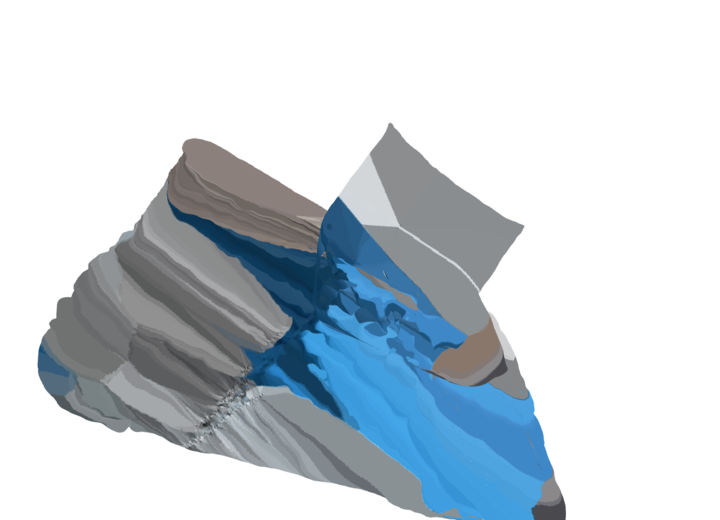
I have no idea what is wrong, Please Help.
Thanks for your precious time.
Contributor guide
No contributing guide indexed for this repository
Assessment
This issue has not been assessed yet.