SceneWidget() not updating until zoom in/out
- Dominant language
- C++
- Stars
- 14k
- Forks
- 2.6k
- Avg merge
- 5d 18h
- Merged PRs (30d)
- 6
Description
### Checklist
> * [x] I have searched for [similar issues](https://github.com/isl-org/Open3D/issues).
> * [ ] For Python issues, I have tested with the [latest development wheel]
> * [x] I have checked the [release documentation](http://www.open3d.org/docs/release/) and the [latest documentation](http://www.open3d.org/docs/latest/) (for master branch).
### The Issue
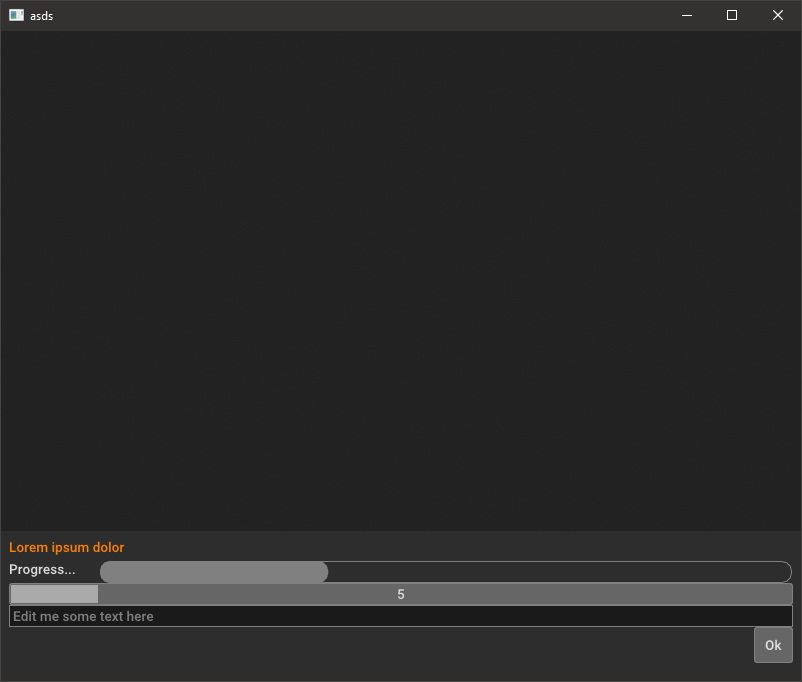
When launching the application, SceneWidget() does not draw objects in the scene unless you manually zoom in or out on the scene...
At start:
After zooming in and out once it is properly displayed:
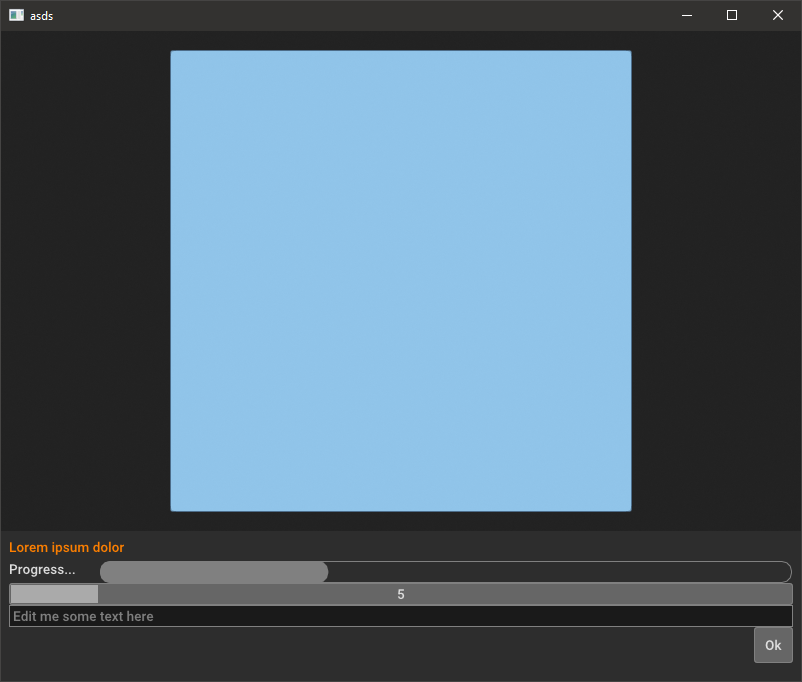
I tried to force_redraw() after adding the object but still have the same problem.
### To Reproduce the Issue
```
import open3d as o3d
import numpy as np
import open3d.visualization.gui as gui
import open3d.visualization.rendering as rendering
class SeamSelector:
def __init__(self):
self.window = gui.Application.instance.create_window("asds", 800, 650)
w = self.window
em = w.theme.font_size
_y = 500
# Create renderer
self.widget3d = gui.SceneWidget()
self.widget3d.scene = rendering.Open3DScene(w.renderer)
self.widget3d.set_view_controls(gui.SceneWidget.Controls.ROTATE_CAMERA)
self.widget3d.scene.set_background([0.4, 0.4, 0.4, 1])
bbox = o3d.geometry.AxisAlignedBoundingBox()
self.widget3d.setup_camera(10.0, bbox, np.array([0.0,0.0,0.0]))
self.widget3d.scene.camera.look_at([0, 0, 0], [0, 0, 19000], [0, 0, 1])
self.widget3d.frame = gui.Rect(0, 0,
w.content_rect.width, _y)
# Create layout
layout = gui.Vert(0, gui.Margins(0.5 * em, 0.5 * em, 0.5 * em,
0.5 * em))
layout.frame = gui.Rect(0, _y,
w.content_rect.width, w.content_rect.height)
#layout.add_child(self.widget3d)
# Label
self._label = gui.Label("Lorem ipsum dolor")
self._label.text_color = gui.Color(1.0, 0.5, 0.0)
layout.add_child(self._label)
# Create a progress bar. It ranges from 0.0 to 1.0.
self._progress = gui.ProgressBar()
self._progress.value = 0.25 # 25% complete
self._progress.value = self._progress.value + 0.08 # 0.25 + 0.08 = 33%
prog_layout = gui.Horiz(em)
prog_layout.add_child(gui.Label("Progress..."))
prog_layout.add_child(self._progress)
layout.add_child(prog_layout)
# Create a slider. It acts very similar to NumberEdit except that the
# user moves a slider and cannot type the number.
slider = gui.Slider(gui.Slider.INT)
slider.set_limits(5, 13)
slider.set_on_value_changed(self._on_slider)
layout.add_child(slider)
# Create a text editor. The placeholder text (if not empty) will be
# displayed when there is no text, as concise help, or visible tooltip.
tedit = gui.TextEdit()
tedit.placeholder_text = "Edit me some text here"
# on_text_changed fires whenever the user changes the text (but not if
# the text_value property is assigned to).
tedit.set_on_text_changed(self._on_text_changed)
# on_value_changed fires whenever the user signals that they are finished
# editing the text, either by pressing return or by clicking outside of
# the text editor, thus losing text focus.
tedit.set_on_value_changed(self._on_value_changed)
layout.add_child(tedit)
# Quit button. (Typically this is a menu item)
button_layout = gui.Horiz()
ok_button = gui.Button("Ok")
ok_button.set_on_clicked(self._on_ok)
button_layout.add_stretch()
button_layout.add_child(ok_button)
layout.add_child(button_layout)
# We're done, set the window's layout
w.add_child(self.widget3d)
w.add_child(layout)
self.construct()
def construct(self):
# Now add a base beneath the object
mesh_box = o3d.geometry.TriangleMesh.create_box(width=3000.0,
height=3000.0,
depth=1.0)
mesh_box.compute_vertex_normals()
mesh_box.translate(np.array([-1500,-1500,-3.0]))
mesh_box.paint_uniform_color([0.3, 0.6, 1])
mat = rendering.MaterialRecord()
mat.shader = "defaultLit"
self.widget3d.scene.add_geometry('sds', mesh_box, mat)
def _on_slider(self, new_val):
self._progress.value = new_val / 20.0
def _on_text_changed(self, new_text):
print("edit:", new_text)
def _on_value_changed(self, new_text):
print("value:", new_text)
def _on_ok(self):
gui.Application.instance.quit()
def main():
gui.Application.instance.initialize()
SeamSelector()
gui.Application.instance.run()
if __name__ == "__main__":
main()
```
Contributor guide
No contributing guide indexed for this repository
Assessment
This issue has not been assessed yet.