Open3d Ray Casting Generates Error in Python
- Dominant language
- C++
- Stars
- 14k
- Forks
- 2.6k
- Avg merge
- 5d 18h
- Merged PRs (30d)
- 6
Description
### Checklist
- [X] I have searched for [similar issues](https://github.com/isl-org/Open3D/issues).
- [X] For Python issues, I have tested with the [latest development wheel](http://www.open3d.org/docs/latest/getting_started.html#development-version-pip).
- [X] I have checked the [release documentation](http://www.open3d.org/docs/release/) and the [latest documentation](http://www.open3d.org/docs/latest/) (for `master` branch).
### My Question
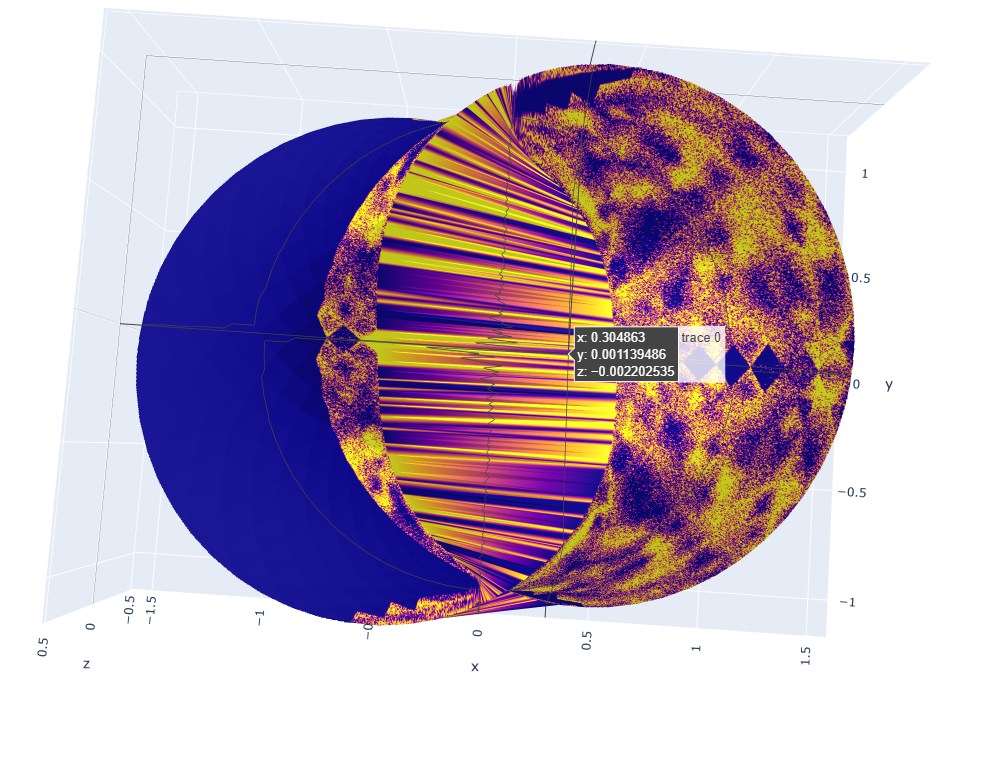
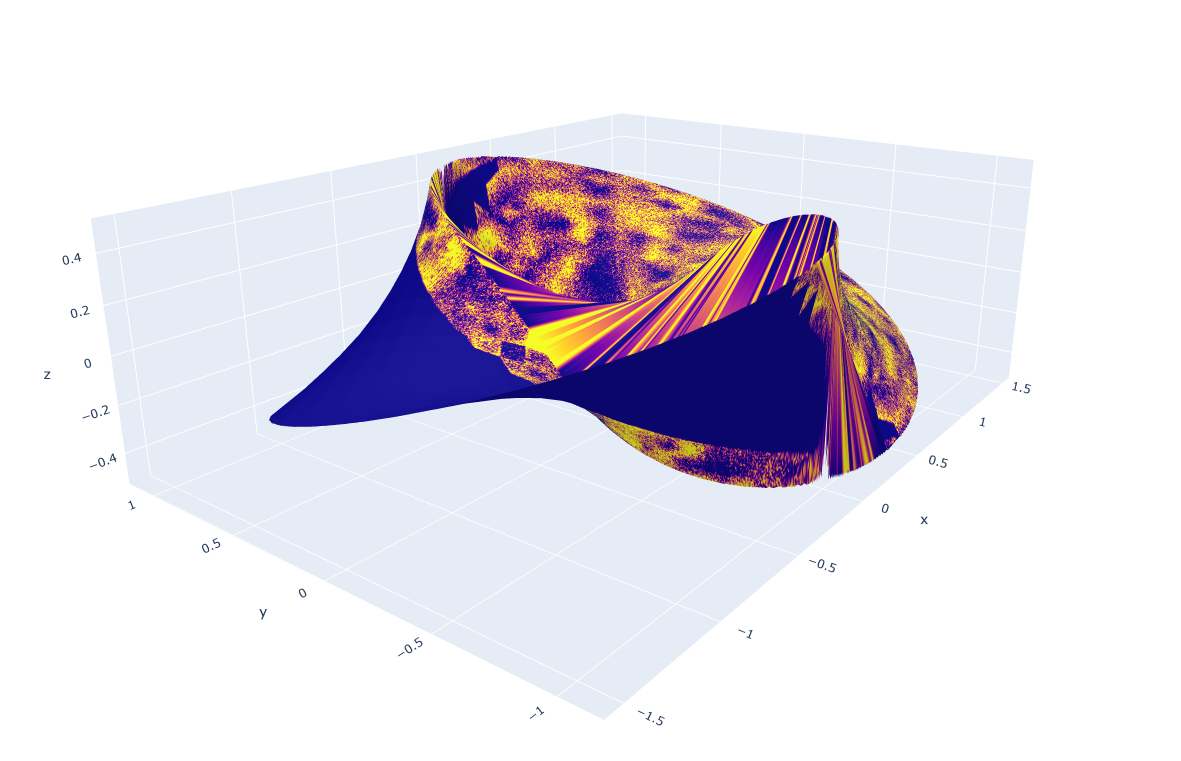
I am using Open3d in Python to cast shadows and determine intersections on an object. In the example below I use a 2 twist mobius strip from the Open3d library as the object and create a tensor for each point on the mobius strip. The tensor origin is the point on the object, and the direction is the same for all tensors: [1,0,0]. Thus, roughly speaking, things to the left (negative x direction) should generally intersect with the object, and things to the right (positive x direction) will generally not intersect. On a macro level I yield this result, as you can see in the two images below. But the lighted (yellow) section is very spotty for some reason. I have tried this with several shapes and get the same result. Why does the Raycasting in Open3d generate such an incorrect and spotty intersection result?
Code:
#create mobius mesh and points
mesh=o3d.geometry.TriangleMesh.create_mobius(twists=2)
mesh.compute_vertex_normals()
pcd = mesh.sample_points_uniformly(number_of_points=1000000)
points=np.asarray(pcd.points)
#create a scene and add the triangle mesh for ray tracing
cube = o3d.t.geometry.TriangleMesh.from_legacy(mesh)
scene = o3d.t.geometry.RaycastingScene()
cube_id=scene.add_triangles(cube)
#create ray
ray=[1,0,0]
ray=ray/np.linalg.norm(ray)
#create array of ray
array=np.ones((len(points),3))*ray[0]
pd.DataFrame(array).loc[:,1]=ray[1]
pd.DataFrame(array).loc[:,2]=ray[2]
array=pd.DataFrame(array)
#create tensor with origin at each point in mobius strip and same direction for all
tensorrays=np.array([points.loc[:,0].values.T, points.loc[:,1].values.T, points.loc[:,2].values.T,`array.loc[:,0].values.T, array.loc[:,1].values.T, array.loc[:,2].values.T]).T `
rays = o3d.core.Tensor([[tensorrays]],dtype=o3d.core.Dtype.Float32)
ans = scene.cast_rays(rays)
#determine if ray intersected the object
intersections=ans['t_hit'].numpy()[0][0]
intersections[intersections==float('inf')]=1
intersections[intersections!=1]=0
pts=1000000
[x,y]=np.meshgrid(np.linspace(np.min(points.loc[:,0].values),np.max(points.loc[:,0].values),int(np.sqrt(pts))), np.linspace(np.min(points.loc[:,1].values),np.max(points.loc[:,1].values),int(np.sqrt(pts))))
z = griddata((points.loc[:,0].values, points.loc[:,1].values), points.loc[:,2].values, (x, y), method='linear',rescale=True)
color = griddata((points.loc[:,0].values, points.loc[:,1].values), intersections, (x, y), method='linear',rescale=True)
#create surface for mobius, colored by 0's and 1's for ray intersection
trace = go.Surface(x=x,y=y,z=z, surfacecolor=color)
fig_data=[trace]
#plot
layout=go.Layout(margin={'l': 0, 'r': 0, 'b': 0, 't': 0})
fig=Figure(data=fig_data,layout=layout) path=r'C:\Users\JosephKenrick\test.html'
pio.write_html(fig, file=path, auto_open=True,validate=False)}
Contributor guide
No contributing guide indexed for this repository
Assessment
This issue has not been assessed yet.