how to maintain the surround view cameras (4 camera images) position in the point cloud
- Dominant language
- C++
- Stars
- 14k
- Forks
- 2.6k
- Avg merge
- 5d 18h
- Merged PRs (30d)
- 6
Description
### Checklist
- [X] I have searched for [similar issues](https://github.com/isl-org/Open3D/issues).
- [X] For Python issues, I have tested with the [latest development wheel](http://www.open3d.org/docs/latest/getting_started.html#development-version-pip).
- [X] I have checked the [release documentation](http://www.open3d.org/docs/release/) and the [latest documentation](http://www.open3d.org/docs/latest/) (for `master` branch).
### My Question
Hi,
I am trying to generate 3D point cloud from 4 RGB-D images. I am able to do that with Open3D but I am unable to maintain the position of the images. You can find the camera_parameters.json [here](https://drive.google.com/file/d/1euk0oB7BXyurH6Bhb9ropMpmbJSjnXY4/view?usp=sharing).
```
import open3d as o3d
import cv2
import os
import numpy as np
import matplotlib.pyplot as plt
import json
def load_json(path):
with open(path) as f:
return json.load(f)
def parse_camera_params(camera):
param = {}
param['camera'] = camera['camera']
param['depth'] = {}
param['depth']['fx'] = camera['K_depth'][0][0]
param['depth']['fy'] = camera['K_depth'][1][1]
param['depth']['cx'] = camera['K_depth'][0][2]
param['depth']['cy'] = camera['K_depth'][1][2]
param['depth']['K'] = camera['K_depth']
# ignore distCoeffs_depth's 5th (1000) and 6th (0) element
# since they are strange
param['depth']['distCoeffs'] = np.array(camera['distCoeffs_depth'][:5])
param['depth_width'] = camera['depth_width']
param['depth_height'] = camera['depth_height']
param['color'] = {}
param['color']['fx'] = camera['K_color'][0][0]
param['color']['fy'] = camera['K_color'][1][1]
param['color']['cx'] = camera['K_color'][0][2]
param['color']['cy'] = camera['K_color'][1][2]
param['color']['K'] = camera['K_color']
# ignore distCoeffs_color's 5th (1000) and 6th (0) element
# since they are strange
param['color']['distCoeffs'] = np.array(camera['distCoeffs_color'][:5])
param['color_width'] = camera['color_width']
param['color_height'] = camera['color_height']
# world to depth
w2d_T = np.array(camera['M_world2sensor'])
param['w2d_R'] = w2d_T[0:3, 0:3]
param['w2d_t'] = w2d_T[0:3, 3]
param['w2d_T'] = camera['M_world2sensor']
d2w_T = np.linalg.inv(w2d_T)
param['d2w_R'] = d2w_T[0:3, 0:3]
param['d2w_t'] = d2w_T[0:3, 3]
param['d2w_T'] = d2w_T
return param
if __name__ == '__main__':
data_dir = "data/"
camera_params = load_json(os.path.join(data_dir,
'camera_parameters.json'))
SVC_NUM = 4
pcd_combined = o3d.geometry.PointCloud()
for i in range(SVC_NUM):
param = parse_camera_params(camera_params['sensors'][i])
color = cv2.imread(os.path.join(data_dir, 'color_{:05d}.png'.format(i)))
color = cv2.cvtColor(color, cv2.COLOR_BGR2RGB)
depth = cv2.imread(os.path.join(data_dir, 'depth_{:05d}.png'.format(i)), -1)
# depth = depth * 0.001 # factor to scale the depth image from carla
o3d_color = o3d.geometry.Image(color)
o3d_depth = o3d.geometry.Image(depth)
rgbd_image = o3d.geometry.RGBDImage.create_from_tum_format(o3d_color, o3d_depth, False)
h, w = depth.shape
dfx, dfy, dcx, dcy = param['depth']['fx'], param['depth']['fy'], param['depth']['cx'], param['depth']['cy']
intrinsic = o3d.camera.PinholeCameraIntrinsic(w, h, dfx,dfy, dcx, dcy)
intrinsic.intrinsic_matrix = param['depth']['K']
cam = o3d.camera.PinholeCameraParameters()
cam.intrinsic = intrinsic
cam.extrinsic = np.array(param['w2d_T'])
pcd = o3d.geometry.PointCloud.create_from_rgbd_image(rgbd_image, cam.intrinsic, cam.extrinsic)
o3d.io.write_point_cloud("svc_{:05d}_v13.pcd".format(i), pcd)
pcd_combined += pcd
o3d.io.write_point_cloud("svc_global_v13.pcd", pcd_combined)
```
With the above code I am getting output of ```svc_global_v13.pcd``` like below
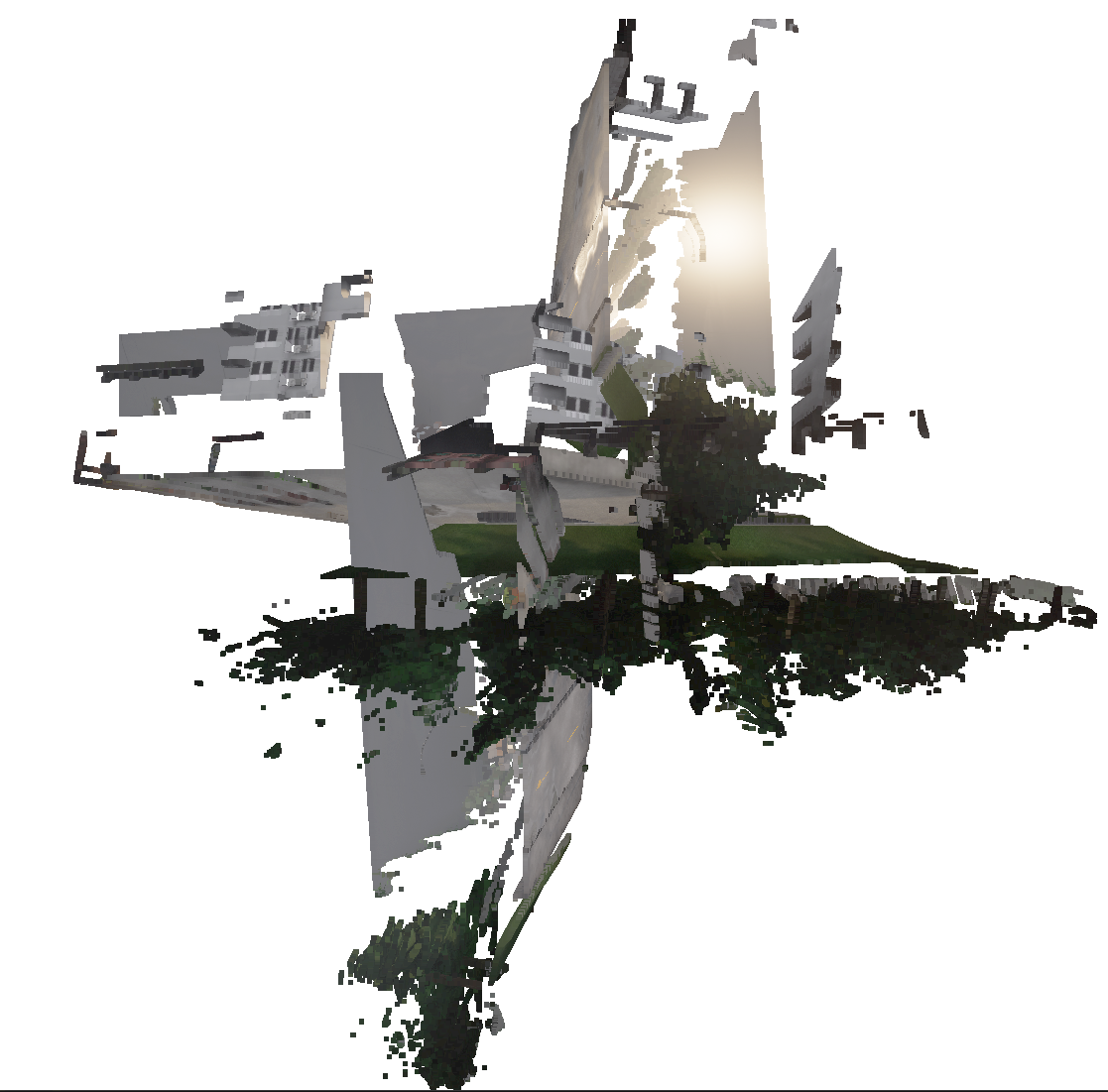
As you can see, all the images are projected into center. As indicated in the json file, I would like the images to be positioned as left, right, front and rear in the 3D point cloud.
It is highly appreciated, if someone can help me to fix this issue.
Thanks.
Contributor guide
No contributing guide indexed for this repository
Assessment
This issue has not been assessed yet.