How to exactly reproduce Material base_color in rendered image?
- Dominant language
- C++
- Stars
- 14k
- Forks
- 2.6k
- Avg merge
- 5d 18h
- Merged PRs (30d)
- 6
Description
### Checklist
- [X] I have searched for [similar issues](https://github.com/isl-org/Open3D/issues).
- [X] For Python issues, I have tested with the [latest development wheel](http://www.open3d.org/docs/latest/getting_started.html#development-version-pip).
- [X] I have checked the [release documentation](http://www.open3d.org/docs/release/) and the [latest documentation](http://www.open3d.org/docs/latest/) (for `master` branch).
### My Question
I am having trouble getting `OffscreenRenderer` to fully respect the Material's `base_color`. Naively I hoped that, by using the `unlitSolidColor` shader and disabling fancy color grading and such via `render.scene.view.set_post_processing(False)`, I could force the colors in the rendered output to exactly match the `base_color` I set on the Material, but that's not the case. Here is an example to reproduce, where I vary one RGB component in the `base_color` and observe how the corresponding component in the rendered output changes:
Click to expand!
```python
import open3d as o3d
import open3d.visualization.rendering as rendering
import numpy as np
import pandas as pd
import matplotlib.pyplot as plt
results = []
for g in np.linspace(0, 1, num=30):
record = {'base green component': g}
for enable_postprocessing in [True, False]:
render = rendering.OffscreenRenderer(640, 480)
yellow = rendering.MaterialRecord()
yellow.base_color = [1.0, g, 0.0, 1.0]
yellow.shader = "unlitSolidColor"
white = rendering.MaterialRecord()
white.base_color = [1.0, 1.0, 1.0, 1.0]
white.shader = "defaultLit"
sphere = o3d.geometry.TriangleMesh.create_sphere(.2)
sphere.compute_vertex_normals()
sphere.translate([-2, 0, 3])
# theoretically only the sphere is needed here, but I can't get
# the sphere to appear unless I include the solid as well?
solid = o3d.geometry.TriangleMesh.create_icosahedron(0.5)
solid.compute_triangle_normals()
solid.compute_vertex_normals()
solid.translate([0, 0, 1.75])
render.scene.add_geometry("sphere", sphere, yellow)
render.scene.add_geometry("solid", solid, white)
render.setup_camera(60.0, [0, 0, 0], [-10, 0, 0], [0, 0, 1])
render.scene.scene.set_sun_light([0.707, 0.0, -.707], [1.0, 1.0, 1.0],
75000)
render.scene.scene.enable_sun_light(True)
render.scene.view.set_post_processing(enable_postprocessing)
img = np.array(render.render_to_image())
pixel = img[80, 320]
record[f'set_post_processing({enable_postprocessing})'] = int(pixel[1])
results.append(record)
results = pd.DataFrame(results).set_index('base green component')
results.plot()
plt.ylabel('rendered green component')
plt.plot([0, 1], [0, 255], c='k', ls=':', label='1:1')
plt.legend()
```
Here is the comparison of the `base_color` green component on the x-axis with rendered green component on the y-axis. With post-processing enabled there is a close match for much (but not all of the range), while disabling post-processing creates significant deviation across nearly all the range.
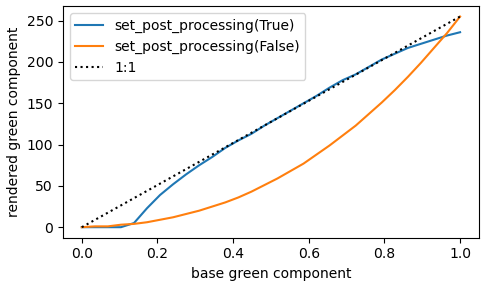
Is there a way to _exactly_ control the color in the rendered image? My goal is exact replication of the `base_color` without regard for what might be more realistic or pleasing to the eye. Thank you!
Contributor guide
No contributing guide indexed for this repository
Assessment
This issue has not been assessed yet.