VGrid row height is not adjusted when nesting multi-line components
- Dominant language
- C++
- Stars
- 14k
- Forks
- 2.6k
- Avg merge
- 5d 18h
- Merged PRs (30d)
- 6
Description
### Checklist
- [X] I have searched for [similar issues](https://github.com/isl-org/Open3D/issues).
- [X] For Python issues, I have tested with the [latest development wheel](http://www.open3d.org/docs/latest/getting_started.html#development-version-pip).
- [X] I have checked the [release documentation](http://www.open3d.org/docs/release/) and the [latest documentation](http://www.open3d.org/docs/latest/) (for `master` branch).
### Describe the issue
When using VGrid with more complex inner widgets, the row height is not scaled accordingly which leads to misalignment of later rows. In the following code example I create a key-value GUI (very common) which should result in the following structure:
```
Name: Text
Vector: x: Number
y: Number
Radius: Number
```
But the resulting GUI looks like the following:
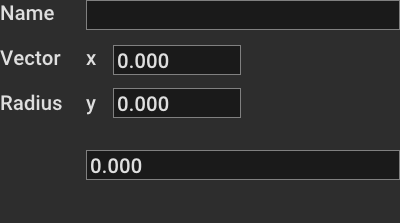
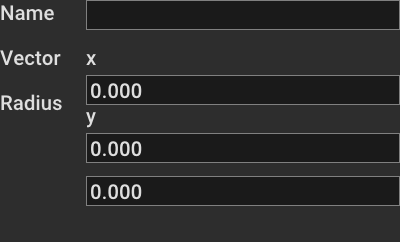
The label `Radius` is added like it would be connected with the `y` component of the vector. Interesting is that it happens with any multi-line component. For example if we would use a `Vert` instead of a `VGrid` for the vector component, the GUI looks like this:
### Steps to reproduce the bug
```python
import open3d.visualization.gui as gui
import open3d as o3d
class DemoWindow:
def __init__(self):
self.window: gui.Window = gui.Application.instance.create_window("Demo Window", 400, 600)
self.window.set_on_layout(self._on_layout)
self.window.set_on_close(self._on_close)
self.panel = gui.VGrid(2, 15)
# create key value element
self.panel.add_child(gui.Label("Name"))
self.panel.add_child(gui.TextEdit())
# add multiline key value element
self.panel.add_child(gui.Label("Vector"))
vector_panel = gui.VGrid(2, 15)
vector_panel.add_child(gui.Label("x"))
vector_panel.add_child(gui.NumberEdit(gui.NumberEdit.DOUBLE))
vector_panel.add_child(gui.Label("y"))
vector_panel.add_child(gui.NumberEdit(gui.NumberEdit.DOUBLE))
self.panel.add_child(vector_panel)
# add another key value element
self.panel.add_child(gui.Label("Radius"))
self.panel.add_child(gui.NumberEdit(gui.NumberEdit.DOUBLE))
self.window.add_child(self.panel)
def _on_layout(self, layout_context):
contentRect = self.window.content_rect
self.panel.frame = contentRect
def _on_close(self):
gui.Application.instance.quit()
if __name__ == "__main__":
app = o3d.visualization.gui.Application.instance
app.initialize()
win = DemoWindow()
app.run()
```
### Error message
_No response_
### Expected behavior
The `Radius` label should be on the same row as the radius value is displayed. Content inside of a VGrid row should be used to determine it's height for all columns.
### Open3D, Python and System information
```markdown
- Operating system: Windows 10 64-bit
- Python version: Python 3.8
- Open3D version: 15.1
- System architecture: x64
- Is this a remote workstation?: no
- How did you install Open3D?: pip
```
### Additional information
_No response_
Contributor guide
No contributing guide indexed for this repository
Assessment
This issue has not been assessed yet.