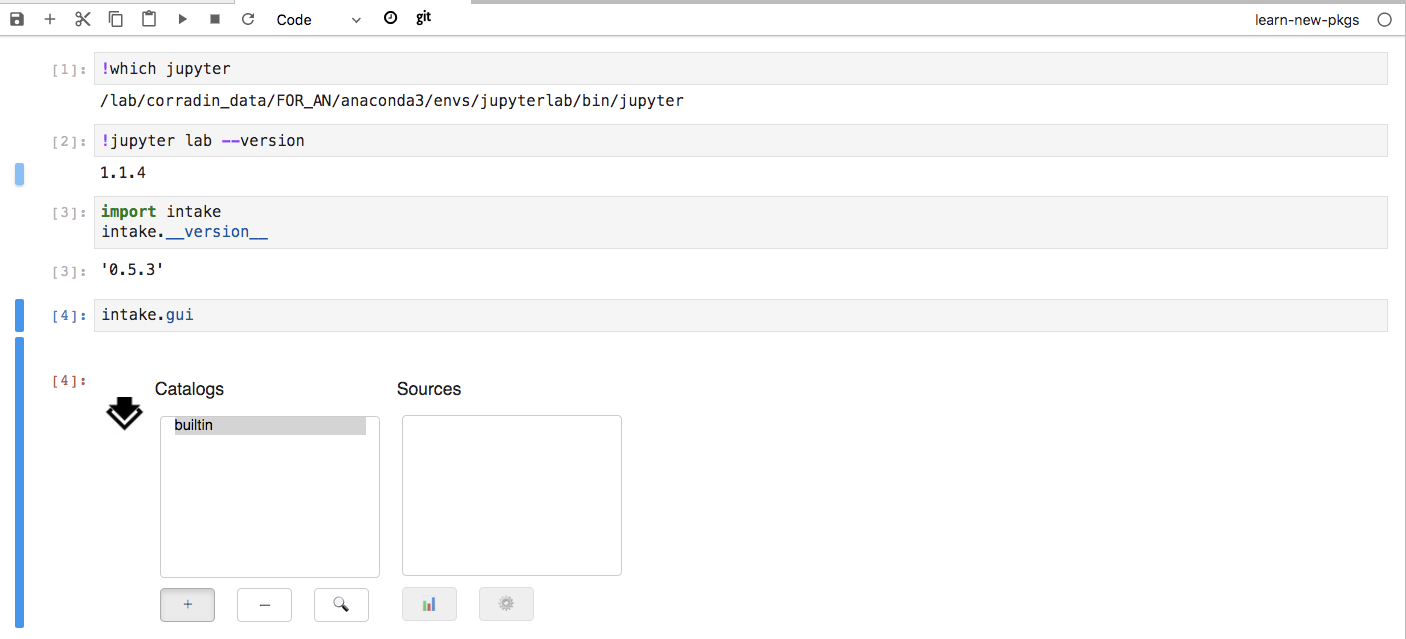
Intake (v0.5.3) GUI not working with Jupyter Lab (v1.1.4)
- Dominant language
- Python
- Stars
- 1.1k
- Forks
- 151
- Avg merge
- 8h 24m
- Merged PRs (30d)
- 2
Description
The widget just gets stuck and nothing happens when you click the buttons. If I launch classic notebook then it works fine
Jupyter lab environment extensions:
```bash
(jupyterlab) anhoang@tak /lab/corradin_cache/SEP_pairs_results$ jupyter labextension list
JupyterLab v1.1.4
Known labextensions:
app dir: /lab/corradin_data/FOR_AN/anaconda3/envs/jupyterlab/share/jupyter/lab
@jupyter-widgets/jupyterlab-manager v1.0.2 enabled OK
@jupyterlab/celltags v0.1.5 enabled OK
@jupyterlab/dataregistry-extension v2.2.2 enabled OK
@jupyterlab/git v0.8.1 enabled OK
@jupyterlab/toc v1.0.1 enabled OK
@krassowski/jupyterlab_go_to_definition v0.7.1 enabled OK
jupyterlab-jupytext v1.0.2 enabled OK
jupyterlab-plotly v1.0.0 enabled OK
jupyterlab_templates v0.2.0 enabled OK
nbdime-jupyterlab v1.0.0 enabled OK
plotlywidget v1.1.0 enabled OK
qgrid v1.1.1 enabled OK
```
Kernel versions:
```bash
(learn-new-pkgs) anhoang@tak /lab/corradin_cache/SEP_pairs_results$ conda list intake
# packages in environment at /lab/corradin_data/FOR_AN/anaconda3/envs/learn-new-pkgs:
#
# Name Version Build Channel
intake 0.5.3 py_0 conda-forge
```
In Jupyter lab:
Contributor guide
No contributing guide indexed for this repository
Assessment
This issue has not been assessed yet.