New Tasks Scheduler - Toast Notification
- Dominant language
- TypeScript
- Stars
- 117
- Forks
- 51
- Avg merge
- 2d 15h
- Merged PRs (30d)
- 4
Description
## ACs
- When the user clicks on either "+ Create Script in Editor" in the Select a Script drop-down, or the "Edit Script" button, navigate the user to the NEW script editor AND display a dismissable toast notification on the script editor screen.
- The toast message should say: "Complete your Task after you save your script."
- The toast notification should have a blue "i" icon indicating that it's an informative message.
- "Complete your Task" should deep-link the user back to their 'Schedule a task' page.
- On the tasks page, auto-select the script that the user just created and saved.
## Intention
- The intention is to encourage the user behavior of creating tasks.
- Tasks deepen usage and user engagement in our application, both of which are directly correlated with increased revenue/growth
- We're also facilitating a paradigm shift so that users start to leverage the invokable scripts functionality that saving a script offers via the NEW script editor in data explorer.
## Implementation
- Figma: https://www.figma.com/file/r91KxurPL3VQ7JMqc9Ldqo/New-Tasks-Experience?node-id=1676%3A39753
- Anytime you navigate the user from the new tasks scheduler page to data explorer, the user MUST be navigated to the NEW data explorer script editor. The new tasks UI must only be synced with the NEW script editor since users cannot save a script in the old editor.
## Context
If the user clicks "+ Create Script in Editor" in the new task scheduler
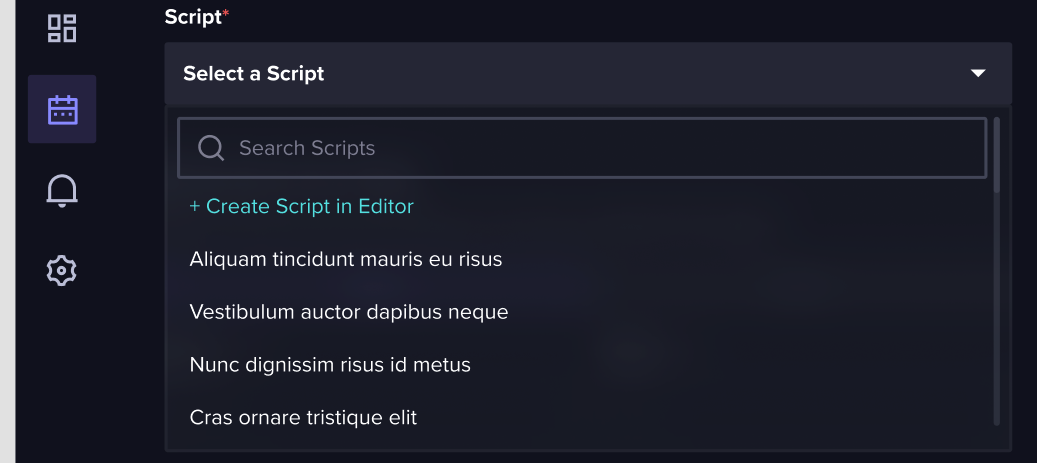
Then navigate them to the new data explorer page and display the toast message below

Contributor guide
No contributing guide indexed for this repository
Assessment
This issue has not been assessed yet.