influxdata / influxdata/docs-v2
Chronograf: compare functionality
- Dominant language
- JavaScript
- Stars
- 82
- Forks
- 326
- Avg merge
- 1d 1h
- Merged PRs (30d)
- 82
Description
Currently there is no documentation which describes the `compare` functionality in Chronograf.
There are some valuable mechanisms built into Chronograf for automatically comparing the same series across two different time ranges. The `compare` functionality provides a mechanism for easily making these kinds of comparisons.
However, based on the way that this is implemented, there are also some manually ways to take advantage of this functionality that goes beyond the automated mechanisms offered through the drop list.
I believe we should document both of these things.
----
### Using the compare drop list
Chronograf has the ability to display a time-shifted comparison of a single, selected series when building the query. ie, showing the some graph and overlaying the same time period but shifted in time. You can use the `Compare:` drop list to select the amount of time-shift to add.
Example:
`
SELECT mean("usage_user") AS "mean_usage_user" FROM "telegraf"."autogen"."cpu" WHERE time > now() - 1h AND time < now() AND "cpu"='cpu-total' GROUP BY time(:interval:) FILL(null)
`
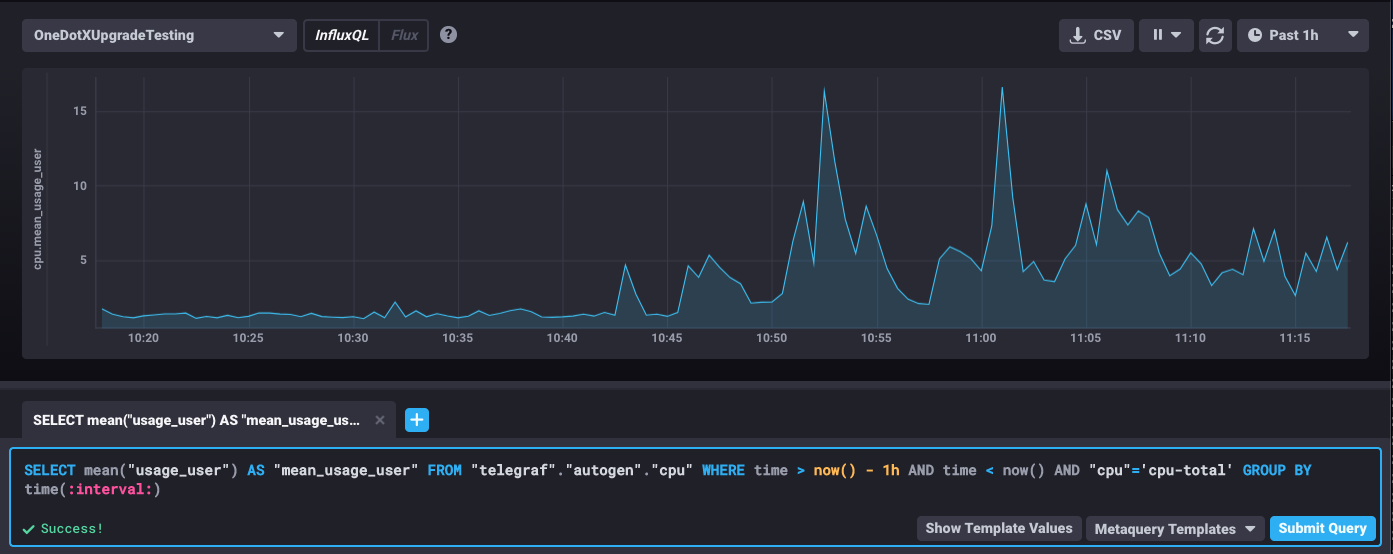
Then select Compare: 1h.
The following graph is displayed
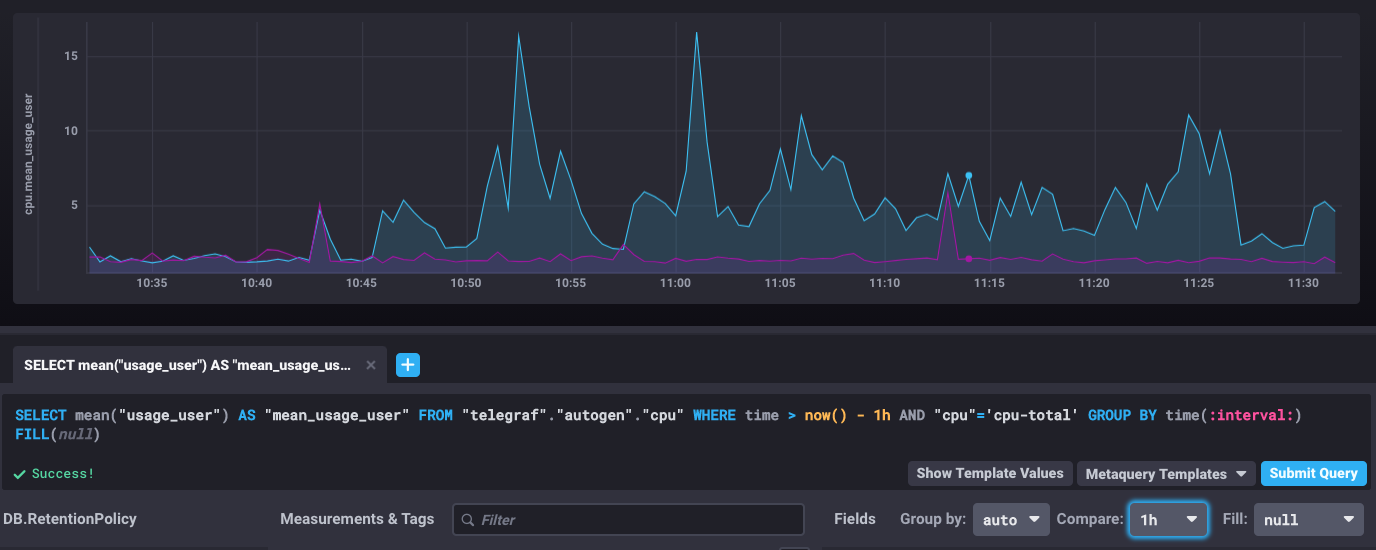
You can change the time range of the query along with changing the compare options to create the time shift comparison that you wish. However, you are limited to the comparison ranges presented in the drop list which are:
`none, 1m, 1h, 12h, 1d, 7d, 30d, 365d`
### Manual comparison
If you want a time-shift value which is not specified within the drop list or if you want to compare multiple series and/or multiple time ranges, you can take advantage of the way in which the query results are being returned and rendered within Chronograf.
Specifically, you can create multiple query tabs which mimic the compare feature and still overlay the results onto the same graph. Here's how:
When you use the compare functionality, Chronograf copies the existing query and attempts to subtract the selected time-shift from the time range specified in the query. It also renames the results appending `_shifted__X__Y` to the series where X is the time amount and Y is the time unit.
If you wanted to use a non-standard time-shift value, you could do the following:
a) create a query like in the example above:
`
SELECT mean("usage_user") AS "mean_usage_user" FROM "telegraf"."autogen"."cpu" WHERE time > now() - 1h AND time < now() AND "cpu"='cpu-total' GROUP BY time(:interval:) FILL(null)
`
b) create a second query in a new tab. But, this time, rename the series based on the desired time shift and subtract that same value from the time range in the query like this:
`
SELECT mean("usage_user") AS "mean_usage_user_shifted__7__m" FROM "telegraf"."autogen"."cpu" WHERE time > now() - 1h -7m and time < now() -7m AND "cpu"='cpu-total' GROUP BY time(:interval:) FILL(null)
`
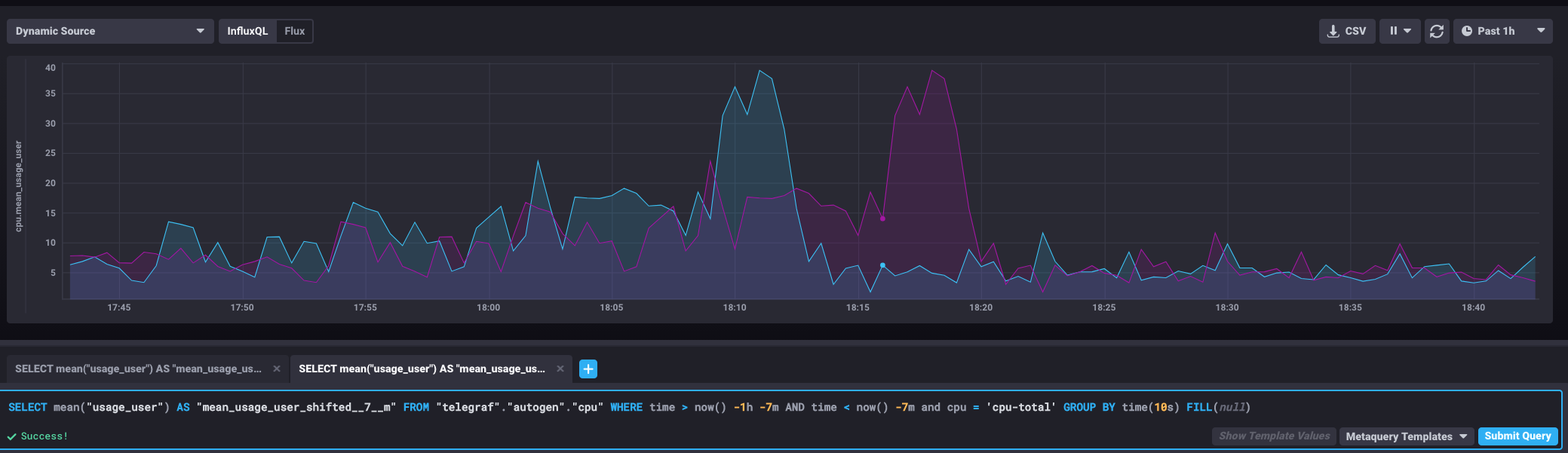
Chronograf will utilize the time ranges specified and the special naming convention to render the results overlaid -- mimicking the functionality of the compare drop list. However, you can also over lay additional time ranges, by adding additional query tabs in this same fashion.
Contributor guide
No contributing guide indexed for this repository
Assessment
This issue has not been assessed yet.